
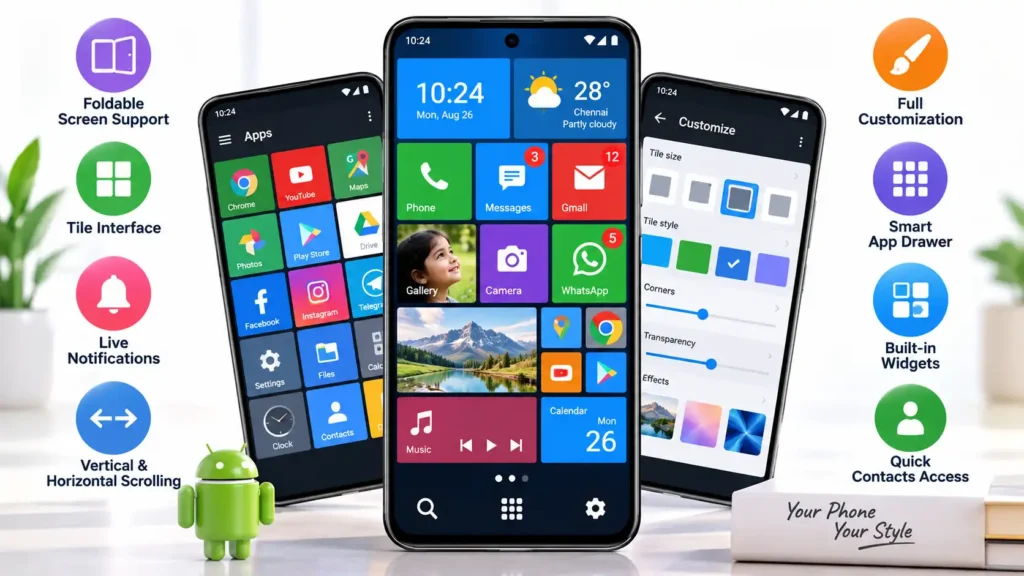
Square Home is an Android launcher designed for users who want a Windows-style tile interface instead of the usual app icon layout.
It is not just a theme app. It changes how the Android home screen looks, how apps are arranged, how widgets are placed, and how users interact with shortcuts and notifications.
For people searching for a Mobile Home Style App, Square Home can be a strong choice if they want a different home-screen experience. But it is not suitable for everyone.
Quick Answer
Square Home is worth trying if you like Windows-style tiles, deep customization, live information, and flexible home-screen layouts.
It is especially interesting for foldable phones and tablets because the tile system can use larger screens more effectively than a simple icon grid.
However, users who prefer a simple Android interface may find Square Home more complicated than necessary.
The app is available on Google Play and includes in-app purchases.
Table of Contents
What Is Square Home?
Square Home is a third-party Android launcher.
A launcher is the part of Android that controls the home screen, app drawer, shortcuts, widgets, and many visual interactions.
Installing Square Home does not convert Android into Windows.
Your phone still runs Android.
Only the home-screen experience changes.
Square Home uses a Metro-style interface inspired by Windows 10 and Windows Phone. Instead of relying only on small app icons, it allows users to create larger and smaller tiles.
These tiles can be arranged based on importance.
For example, frequently used apps such as Phone, Messages, Maps, Camera, WhatsApp, or Gmail can be placed in larger tiles.
Less-used apps can remain smaller or stay inside the app drawer.
This creates a home screen that works more like a personal dashboard.
Why People Search for a Mobile Home Style App
Many Android users eventually become bored with the standard home-screen layout.
Most Android phones use a similar structure:
App icons, folders, widgets, wallpaper, and a dock at the bottom.
A launcher like Square Home offers a completely different visual approach.
Some people may want it because they previously used Windows Phone.
Others may simply want a home screen that shows more useful information without opening several apps.
This second use case is more important than the Windows-style appearance.
A well-designed Square Home layout can help users decide what deserves attention immediately after unlocking the phone.
Square Home Is More Useful as a Dashboard
The biggest advantage of Square Home is not the Windows appearance.
Its real strength is information prioritization.
A normal Android launcher usually gives most app icons roughly the same visual importance.
Square Home allows users to make important apps larger and less important apps smaller.
A user might create a home screen with:
A large calendar tile.
A medium weather widget.
A large Phone tile.
A medium WhatsApp tile.
Small banking and utility app tiles.
A music control widget.
This kind of arrangement can reduce unnecessary searching.
Instead of scrolling through several home pages, commonly used actions can remain visible in one place.
Metro-Style Tiles
Square Home uses a tile-based interface inspired by Microsoft’s Metro design.
Tiles can be customized in different sizes and layouts.
This can make the home screen more visually organized, especially when users assign different tile sizes based on importance.
The benefit is practical.
Users do not need to treat every application equally.
Important apps can remain immediately visible while rarely used apps stay in the background.
However, users should avoid filling every available space.
When too many tiles compete for attention, the home screen can become harder to use rather than easier.
Live Notifications and Information
Square Home can display notification-related information on tiles.
This makes it possible to see useful updates without opening every application.
For example, a user may notice unread information directly from the home screen.
This can be helpful for productivity.
But there is also a privacy consideration.
If notification information is displayed directly on the home screen, someone looking at an unlocked phone may be able to see information that would otherwise remain hidden.
Users should therefore decide which tiles should display notification details.
More information on the home screen is not always better.
Smart App Organization
Square Home includes an app drawer designed to organize applications based on usage.
This can help users who have many installed apps.
Instead of manually searching through a long list every time, frequently used applications may become easier to access.
This feature is most useful on phones with dozens or hundreds of installed apps.
Users with only a small number of apps may not notice much benefit.
Foldable Phone Support
Square Home is particularly interesting for foldable Android devices.
Large foldable screens often have more usable space than normal smartphone displays.
A conventional launcher may simply place more icons across the screen.
Square Home can use that additional space for larger tiles, widgets, notifications, shortcuts, and information.
For example, a foldable user could keep a calendar, messaging shortcuts, media controls, and frequently used apps visible at the same time.
This makes the launcher more than a cosmetic customization tool.
It can become a practical large-screen dashboard.
Users should still test how their layout behaves when switching between folded and unfolded modes.
Different foldable devices can handle launcher layouts differently.
Vertical and Horizontal Scrolling
Square Home supports both vertical and horizontal navigation.
Users can scroll vertically within pages and move horizontally between different pages.
This offers more layout flexibility than launchers that rely on only one type of navigation.
However, excessive page creation can make navigation confusing.
A simpler layout is usually easier to use.
New users should start with one or two pages rather than immediately creating a complicated multi-page setup.
Customization Is a Major Strength
Square Home provides extensive customization options.
Users can change tile sizes, appearance, layout, widgets, effects, and other home-screen elements.
This makes it suitable for people who enjoy designing their phone interface.
But customization also creates a learning curve.
Some users may spend a lot of time adjusting settings before they reach a comfortable layout.
For this reason, Square Home is better suited to users who enjoy experimentation.
People who want a launcher that requires almost no setup may prefer a simpler option.
A Better Way to Set Up Square Home
When installing Square Home for the first time, it is better not to customize everything immediately.
Start with only the apps used several times every day.
Create a simple first page.
Use it normally for one or two days.
Then decide which apps deserve larger tiles and which ones can remain smaller.
After that, add widgets, effects, additional pages, and notification information only where they are genuinely useful.
This approach prevents the launcher from becoming visually crowded.
The most customized layout is not always the most useful layout.
Performance Considerations
A launcher is one of the most frequently used parts of Android.
Even small delays can become noticeable because users repeatedly return to the home screen throughout the day.
Square Home includes animations, widgets, live information, and visual effects.
These features may require more resources than a very simple stock launcher.
Performance can depend on:
Phone hardware.
Android version.
Number of widgets.
Number of live tiles.
You May Also Like

![Epic Themes Launcher App 2026 [ELEGANT THEMES]: Is It Worth Trying for Android Customization?](https://tnshorts.com/wp-content/uploads/2026/05/epic-themes-launcher-app-2026-300x225.png "Epic Themes Launcher App 2026 [ELEGANT THEMES]: Is It Worth Trying for Android Customization? 4")
Visual effects.
Background applications.
Device manufacturer software.
Users with older or lower-powered phones should test responsiveness before creating a complicated layout.
Pay attention to how quickly the phone returns to the home screen, opens apps, and scrolls between pages.
Things to Know Before Installing
Square Home may request advanced Android permissions for certain launcher actions.
According to the developer information, Device Administrator permission may be required on Android versions lower than Android 9 for the screen-lock launcher action.
The app may also use Android Accessibility services when necessary for actions such as:
Expanding notifications.
Opening Quick Settings.
Opening recent apps.
Locking the screen.
Opening the power dialog.
Accessibility permission is a powerful Android capability.
Users should understand why an app is requesting it.
Do not automatically approve every optional permission.
If a particular launcher action is not needed, users should check whether the related access is necessary.
Safety and Privacy Considerations
Square Home is available through Google Play.
That is the recommended place to install it.
Avoid downloading unofficial APK versions from unknown websites.
Users should also review the current Google Play Data Safety section before installing.
Privacy declarations can change after app updates.
TNShorts does not recommend describing any third-party app as completely safe.
A better approach is to check:
Official Play Store availability.
Current permissions.
Developer privacy policy.
Accessibility usage.
Device Administrator access.
Recent app updates.
Users should also review permissions again after major updates.
Benefits of Square Home
Square Home can provide several practical advantages.
It offers a home-screen experience that looks significantly different from the standard Android layout.
Users can visually prioritize important apps.
Tiles can help create an information-focused dashboard.
Widgets can be integrated directly into the layout.
Notifications can become easier to notice.
Foldable and tablet users may benefit from better use of large-screen space.
Users who previously liked Windows Phone may also enjoy the familiar design style.
Limitations
Square Home is not ideal for every Android user.
The biggest limitation is complexity.
Users who prefer simple interfaces may find the launcher overwhelming.
The tile layout also requires some adjustment.
People who have used traditional Android home screens for many years may initially search for apps in familiar icon positions.
Extensive animations and widgets may also affect responsiveness on some devices.
Some features may require additional permissions.
Certain features may be available through in-app purchases.
Another limitation is that launcher behavior can vary between Android manufacturers.
Gesture navigation, battery optimization, widgets, and default launcher settings may behave differently depending on the phone.
Who Should Use Square Home?
Square Home is a good choice for users who want a Windows-style Android launcher.
It also suits users who enjoy customizing their home screen.
Foldable phone owners may find the tile layout particularly useful.
It can also work well for people who want important apps and information visible immediately after unlocking their phone.
Former Windows Phone users are another obvious audience.
Who Should Avoid Square Home?
Users who already like their phone’s default launcher may not need Square Home.
It may also be unsuitable for people who dislike customization.
Users with older phones should test performance carefully.
People who want the simplest possible Android interface may prefer a more traditional launcher.
Users who are uncomfortable granting advanced permissions for optional features should also review the app carefully before enabling those functions.
Better Alternatives
Square Home is not automatically the best launcher for everyone.
Microsoft Launcher may suit users who want Microsoft-related productivity features without recreating the Windows Phone tile interface.
Smart Launcher may be a better option for users who prefer automatic app organization and a more modern Android-style design.
Launcher 10 may appeal to users mainly interested in recreating the classic Windows Phone appearance.
Samsung users who value stability and deep Galaxy integration may simply prefer One UI Home.
Pixel users may prefer Pixel Launcher if simplicity and native Android integration matter more than customization.
The best launcher depends on what the user wants to improve.
Someone looking for productivity may choose differently from someone looking for visual customization.
Quick Decision Guide
| User Need | Square Home |
|---|---|
| Windows-style tile interface | Excellent choice |
| Deep customization | Very good |
| Foldable phone layout | Worth trying |
| Information-rich home screen | Very good |
| Simple stock Android experience | Not ideal |
| Minimal setup | Not ideal |
| Complete Windows operating system | Not provided |
| Basic cosmetic change only | Probably unnecessary |
Is Square Home a Windows 10 Launcher?
Square Home is a Windows-inspired Android launcher.
It provides Metro-style tiles and a Windows-like home-screen appearance.
It does not install Windows 10 and does not replace Android.
Will Square Home Delete Existing Apps?
No.
Changing the Android launcher does not normally uninstall existing applications.
It only changes how apps and the home screen are displayed.
Can Users Return to the Original Launcher?
Yes.
Android allows users to change the default Home app.
The exact setting location depends on the phone manufacturer and Android version.
Does Square Home Support Foldable Phones?
Yes.
Foldable device support is one of the features highlighted by the developer.
Users should still test layouts in both folded and unfolded modes.
Why Does Square Home Request Accessibility Permission?
Accessibility services may be used for specific launcher actions such as opening notifications, recent apps, Quick Settings, screen lock, or the power menu.
Users should only enable permissions required for features they intend to use.
Is Square Home Completely Safe?
No third-party app should be described as completely safe.
Users should install Square Home from Google Play, review permissions, check the current Data Safety information, and read the developer privacy policy before enabling advanced access.
Does Square Home Work on Older Phones?
It can work on older phones, but performance depends on the device.
Users should test app opening, scrolling, animations, and widget responsiveness before creating a complex home-screen layout.
Is Square Home Worth Installing?
Square Home is worth trying if you want a genuinely different Android home-screen experience.
Its strongest features are the tile interface, extensive customization, live information, flexible layouts, and foldable screen support.
Its biggest weakness is complexity.
Users can easily spend too much time configuring the launcher, and advanced features may require additional permissions.
For former Windows Phone users, customization enthusiasts, and foldable device owners, Square Home can be an excellent launcher to test.
For users who value simplicity and familiarity, the default launcher or a lighter alternative may be better.
The best approach is to install Square Home from Google Play, build a simple home screen first, and use it normally for a few days.
If the tile layout genuinely makes daily phone use faster and easier, then deeper customization may be worthwhile.
Editorial Disclosure
TNShorts publishes independent Android app reviews, guides, comparisons, and educational content.
Content is based on publicly available information, practical analysis, and user-focused evaluation.
Features, pricing, permissions, privacy practices, and availability may change over time.
Readers should verify important information through official developer sources before making decisions.
More Articles You May Like
 NEW STYLE Nextron Launcher 2026: Should You Try This Android Launcher?
 Tree Launcher App for Android 2026 – Features, Benefits & Safe Alternatives
 SpaceWalker Space Theme Launcher App for Android 2026 – What It Does and Why Users Install It
 What Is New CMM Launcher Apps on Android (ULTIMATE LAUNCHER 2026)?