
Android users are constantly looking for new ways to improve the appearance and functionality of their smartphones. While the default Android interface works well, many users prefer a launcher that offers more customization, better organization, improved privacy features, and a unique visual experience.
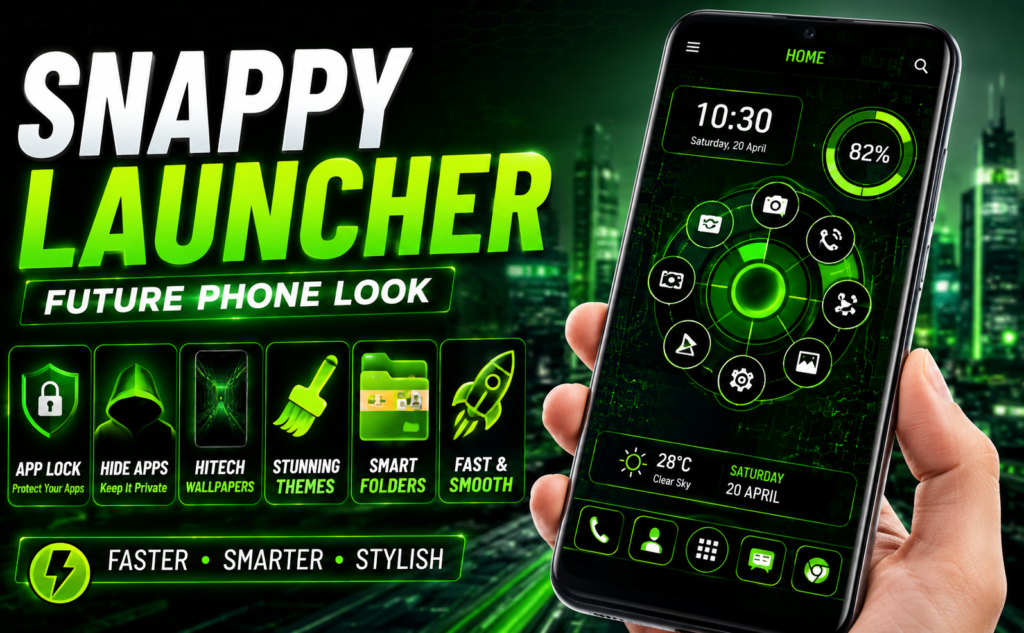
Snappy Launcher is one such Android launcher designed to give smartphones a futuristic and next-generation appearance. Along with customization tools, it also includes useful features such as App Lock, Hide App, Hitech Wallpapers, Themes, Keyboard Designs, and Folder Management.
This guide explains everything Android users need to know about Snappy Launcher, including its features, benefits, who should use it, and how it can help personalize an Android device.
Quick Overview
| Feature | Details |
|---|---|
| App Name | Snappy Launcher |
| Category | Personalization |
| Platform | Android |
| Main Purpose | Home Screen Customization |
| Privacy Features | App Lock, Hide App |
| Customization | Themes, Wallpapers, Keyboard Designs |
| Organization Tools | Folder Management |
| Best For | Android Customization Lovers |
| User Level | Beginner to Advanced |
What Is Snappy Launcher?
Snappy Launcher is an Android launcher application that replaces the default home screen and app drawer with a more customizable interface.
The launcher focuses on combining modern design, personalization, privacy tools, and faster navigation into a single application.
Instead of installing multiple apps for themes, app locking, wallpapers, and customization, users can access many of these features from one launcher.
Why Do Android Users Use Launchers?
Many Android users install launchers because they want:
- Better home screen customization
- More theme options
- Faster app access
- Privacy tools
- Better organization
- Modern user interface designs
- Improved visual experience
Launchers allow users to completely change how their phones look and feel without replacing the device itself.
Main Features of Snappy Launcher
App Lock Feature
Privacy is one of the most important concerns for smartphone users.
Snappy Launcher includes a built-in App Lock feature that allows users to protect selected applications with a password.
This can help prevent unauthorized access to:
- Messaging apps
- Social media apps
- Photo galleries
- Banking applications
- Personal apps
Since App Lock is integrated into the launcher, users do not need a separate app-locking application.
Hide App Feature
Many users prefer to keep certain applications hidden from the main app list.
Snappy Launcher includes a Hide App feature that allows users to conceal selected apps.
This feature may be useful for:
- Personal applications
- Private tools
- Work-related apps
- Less frequently used apps
The launcher supports fingerprint-based authentication for accessing hidden apps, depending on device compatibility.
Hitech Wallpapers
Wallpaper customization remains one of the most popular Android personalization features.
Snappy Launcher provides access to futuristic and hitech wallpaper styles designed to create a modern smartphone appearance.
Popular wallpaper categories include:
- Futuristic designs
- Neon effects
- Technology themes
- Sci-fi inspired backgrounds
- Digital artwork
- Abstract visuals
These wallpapers help create a premium and next-generation look.
Multiple Theme Options
Themes are one of the biggest reasons people install launchers.
Snappy Launcher includes various color themes that allow users to personalize the appearance of:
- Home screen
- App drawer
- Icons
- Menus
- Launcher interface
Different themes make it easy to switch between styles without changing devices.
Hitech Keyboard Designs
The launcher includes a collection of futuristic keyboard styles.
Users can choose from multiple keyboard designs that match the overall appearance of their customized Android setup.
Benefits include:
- Better visual consistency
- Unique appearance
- Personalized typing experience
- Modern design styles
Keyboard customization is especially popular among users who enjoy complete phone personalization.
Folder Management
Managing large numbers of apps can become difficult over time.
You May Also Like
 Home App Review: Windows-Style Android Launcher Worth Using?
 Orbit Launcher Sci-fi AI Theme Review: Should You Replace Your Android Launcher?
![Epic Themes Launcher App 2026 [ELEGANT THEMES]: Is It Worth Trying for Android Customization?](https://tnshorts.com/wp-content/uploads/2026/05/epic-themes-launcher-app-2026-300x225.png "Epic Themes Launcher App 2026 [ELEGANT THEMES]: Is It Worth Trying for Android Customization? 3") Epic Themes Launcher App 2026 [ELEGANT THEMES]: Is It Worth Trying for Android Customization?
Epic Themes Launcher App 2026 [ELEGANT THEMES]: Is It Worth Trying for Android Customization?
 NEW STYLE Nextron Launcher 2026: Should You Try This Android Launcher?
Snappy Launcher includes folder functionality that allows users to organize applications more effectively.
Examples include:
Social Folder
- Messenger
- Telegram
Work Folder
- Office apps
- Productivity tools
Entertainment Folder
- Music apps
- Streaming apps
- Games
This organization helps reduce clutter and improve navigation.
Faster and Smarter Performance
Many launcher users want a smoother home screen experience.
Snappy Launcher focuses on providing:
- Fast navigation
- Quick app access
- Smooth interface interactions
- Efficient app organization
A cleaner interface can make daily phone usage more comfortable.
Elegant User Interface
The launcher uses a modern design philosophy that focuses on:
- Simplicity
- Visual appeal
- Easy navigation
- User-friendly controls
This helps both new and experienced Android users quickly adapt to the launcher.
Who Should Use Snappy Launcher?
Snappy Launcher may be suitable for:
Android Customization Fans
Users who frequently change wallpapers, themes, and icons.
Privacy-Conscious Users
People who want App Lock and Hide App functionality.
Minimalist Users
Individuals who prefer organized folders and cleaner home screens.
Technology Enthusiasts
Users who enjoy futuristic designs and hitech visual styles.
New Android Users
People looking for an easy way to personalize their smartphones.
Benefits of Using Snappy Launcher
All-in-One Personalization
Instead of installing separate apps for:
- App Lock
- Hide Apps
- Themes
- Wallpapers
- Keyboard Customization
users can manage multiple personalization features from one launcher.
Better Phone Organization
Folders help keep apps categorized and easy to locate.
Improved Visual Experience
Themes and wallpapers provide a fresh look for Android devices.
Enhanced Privacy
Built-in privacy tools add an extra layer of convenience.
Easier Navigation
Organized layouts can make app access faster and more efficient.
How to Get Started
Using Snappy Launcher is straightforward:
- Install the launcher.
- Set it as the default launcher.
- Choose a theme.
- Apply wallpapers.
- Organize apps into folders.
- Enable App Lock if desired.
- Customize the keyboard style.
Most users can complete basic setup within a few minutes.
Is Snappy Launcher Safe to Use?
As with any Android application:
- Download from trusted sources.
- Review permissions.
- Keep apps updated.
- Use official app stores.
Users should always read app information and privacy details before installation.
When Should You Consider Using Snappy Launcher?
Snappy Launcher may be useful if:
- You dislike your phone’s default launcher.
- You want more customization options.
- You need app privacy features.
- You enjoy futuristic themes.
- You want a fresh Android experience.
If you are satisfied with your current launcher and do not need additional customization, switching may not be necessary.
Final Thoughts
Snappy Launcher combines Android personalization, privacy tools, themes, wallpapers, folder management, and keyboard customization into a single application. Its futuristic design approach and built-in features make it an attractive option for users who want more control over how their smartphones look and function.
Whether you are interested in App Lock, Hide App functionality, hitech wallpapers, modern themes, or better organization, Snappy Launcher offers a variety of tools that can help transform the Android experience without requiring multiple separate applications.
More Articles You May Like
 Tree Launcher App for Android 2026 – Features, Benefits & Safe Alternatives
 SpaceWalker Space Theme Launcher App for Android 2026 – What It Does and Why Users Install It
 What Is New CMM Launcher Apps on Android (ULTIMATE LAUNCHER 2026)?
![What Is ChromaFusion Launcher Apps for Android 2026? [STYLE SCREEN]](https://tnshorts.com/wp-content/uploads/2026/02/ChromaFusion-Launcher-App-300x200.webp "What Is ChromaFusion Launcher Apps for Android 2026? [STYLE SCREEN] 8") What Is ChromaFusion Launcher Apps for Android 2026? [STYLE SCREEN]
What Is ChromaFusion Launcher Apps for Android 2026? [STYLE SCREEN]