
Quick Answer
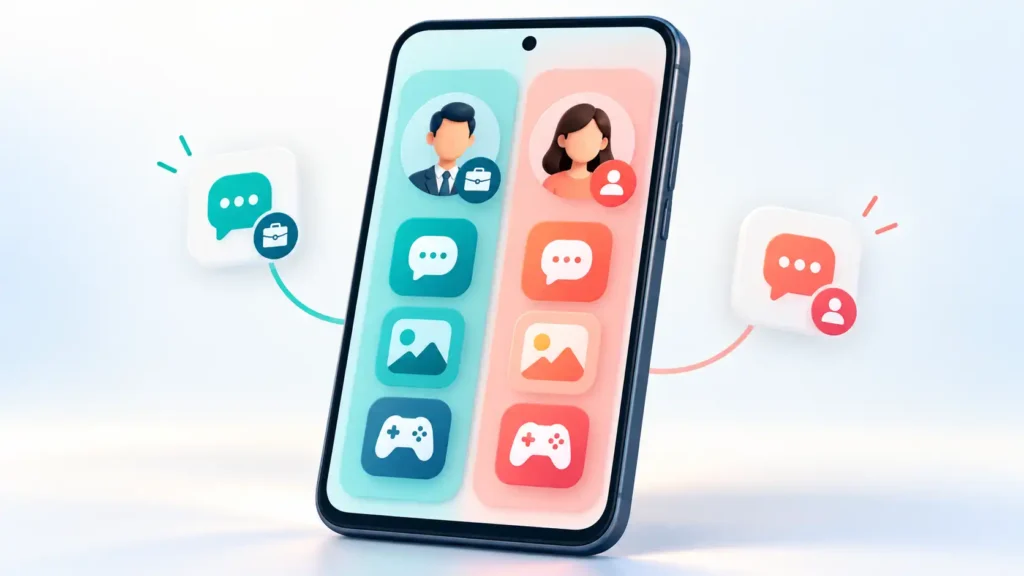
Multi Clone – Parallel Space is an Android app designed to let you use separate accounts for supported apps on one phone. It can reduce repeated logging in and out, but it adds another app to manage and trust. Check your original app’s account switcher or your phone’s built-in dual-app feature first. Consider cloning only when those options do not meet your needs.
What Does “Cloning an App” Actually Mean?
Think of app cloning as creating another place to sign in. For example, you might use one account for personal conversations and another for customer enquiries.
It does not create a new account for you, supply a second phone number, or automatically copy your existing conversations into a different account. You still need valid login details and any verification the original service requires.
The linked product is Multi Clone – Parallel Space by KeepTop, listed in Google Play’s Tools category with ads and in-app purchases. Check the developer and listing link carefully because similar app names can be confusing.
The Useful Part: Fewer Account-Switching Interruptions
The developer advertises separate account data and an app lock. These features could help someone keep personal and secondary accounts organised, although the listing alone does not establish how strong that separation is.
The practical question is whether a second app environment makes your everyday task easier.
For example, someone handling a community account may benefit from a separate place to open it. Someone who changes accounts once a week may find an existing account switcher entirely sufficient.
Two account spaces also do not automatically prevent mistakes. Before sending a message, uploading a picture, or sharing a document, check which account is active.
Check These Alternatives Before Installing
Start with the simplest option that supports your actual account.
| Option | Best suited to | Main advantage | Trade-off |
|---|---|---|---|
| Original app’s account switcher | Services that already support multiple accounts | Avoids adding a third-party cloning app | Account limits and features depend on the service |
| Phone’s built-in dual-app feature | Supported phones and messaging apps | Provides a second instance through phone settings | Only selected devices and apps qualify |
| Employer-managed Android Work Profile | Organisation-controlled work accounts | Separates work apps and data under workplace management | Requires an appropriate work setup and policies |
| Third-party cloning app | A supported account that the options above cannot accommodate | Offers another route to account separation | Adds compatibility, privacy, and maintenance questions |
WhatsApp documents support for two accounts on one mobile device. Telegram also supports switching between accounts without logging out. Check those official options before cloning either app.
Samsung’s Dual Messenger supports two instances of selected messaging apps on compatible Galaxy devices. It does not support every app or phone.
For company accounts, an Android Work Profile has a different purpose: your organisation manages work apps and data separately from personal content. A consumer cloning app should not be assumed to provide equivalent controls.
Limitations That Matter More Than a Successful Login
Opening an app and signing in is only the first test. The more useful question is whether the features you depend on continue working during ordinary use.
Notifications need testing with the screen off
Android can defer background network activity when a device or app is idle. That makes background message delivery worth checking—not just messages received while the cloned app is open. This is a general Android consideration, not a confirmed defect in Multi Clone.
If you need timely customer enquiries or calls, test delivery after leaving the phone unused and again after restarting it.
Compatibility includes more than launching
Check the complete task you need: sign-in, attachments, voice messages, calls, account recovery, or purchases.
Do not assume that a working home screen proves every feature works. Likewise, an update to the original app, cloning tool, or Android can make retesting worthwhile.
More accounts can mean more phone resources
Additional active sessions, downloaded media, and cached files can increase storage and resource use. The effect depends on the apps and your phone; no measured performance results are available for this guide.
Game rules still apply
Before using a second game account, check the game’s rules on multiple accounts and third-party environments. Cloning does not override those rules or guarantee faster progress.
Safety and Privacy: Read Beyond the App Lock
The Play listing reviewed for this guide declares potential collection of personal information, financial information, and other categories. It also declares possible sharing of financial information and device identifiers, encryption in transit, and that data cannot be deleted. These are developer-provided disclosures, not independent audit findings.
The linked privacy policy names third-party services including AdMob, Firebase analytics and crash reporting, and Facebook. It describes diagnostic information such as IP address, device details, and usage-related logs.
These disclosures do not establish that the app is malicious. They do mean you should not interpret “privacy protection” as “no data collection.”
You May Also Like
![Apps Clone Android 2026 [VARIOUS APPS]: Is “Multi App: Dual Space” Really Safe to Use?](https://tnshorts.com/wp-content/uploads/2025/11/Young-Indian-Woman-Showing-Various-Apps-on-Smartphone-–-Apps-Clone-Android-2025-300x200.png "Apps Clone Android 2026 [VARIOUS APPS]: Is “Multi App: Dual Space” Really Safe to Use? 1")
Three distinctions help:
- An app lock controls access through an interface. It does not, by itself, establish what information the app or its service providers collect.
- Encryption in transit concerns data travelling over a connection. It does not establish encryption of every locally stored account file.
- Separate account data is an organisational feature. It is not proof that accounts are anonymous or unconnected from the original service’s perspective.
For privacy questions the documentation does not resolve, ask the developer before adding sensitive accounts.
Things to Know Before Installing
First, confirm that you can recover the account without relying on the cloned session. Keep access to its recovery email, phone number, and any required recovery codes.
Then review permission requests in context. A camera permission may be relevant to video calls; that does not mean every permission is necessary for your intended use. If the purpose is unclear, pause and check the explanation.
Check the price and purchase terms on your own device. The listing identifies in-app purchases, but this guide does not verify regional prices or which features require payment.
Finally, plan how you will leave. Confirm that important content is synced or exported before deleting a clone or clearing the cloning app’s storage. Account recovery and recovery of unsynced local files are separate issues.
Check Multi Clone – Parallel Space on Google Play
A Practical Test Before Depending on It
Use a secondary, non-critical account first.
| Test | What to check |
|---|---|
| Receive a message while the phone is idle | Does it arrive when you need it? |
| Tap the notification | Does it open the correct account? |
| Send an attachment | Can you select the intended file and recipient? |
| Restart the phone | Can you reopen the account and receive new messages? |
| Check lock-screen previews | Is private message content visible despite the app lock? |
| Review recovery and sync | Can you regain access and retrieve important content independently? |
These are suggested checks, not claims that Multi Clone passes or fails them.
The lock-screen test is especially useful: a locked app is not enough if your main privacy concern is someone reading notification previews.
Who Should Use It—and Who Should Avoid It?
Multi Clone may deserve a trial if you need a secondary account, the original app lacks suitable account switching, and your phone does not provide a supported alternative. You should also be comfortable reviewing its privacy disclosures and testing compatibility.
Avoid making it your first choice for:
- Banking, payment, or essential authentication accounts.
- Confidential work accounts without employer approval.
- Time-sensitive communications you have not tested thoroughly.
- A phone already struggling with storage or performance.
- Any account you cannot independently recover.
These recommendations reflect the consequences of a failure and the additional software involved, rather than a finding that Multi Clone has compromised accounts.
Frequently Asked Questions
Is Multi Clone the same as every app called Parallel Space?
No. Similar names do not establish that products share a developer, privacy policy, or capabilities. This guide covers the KeepTop listing linked above.
Do I need a second SIM card?
That depends on the service you want to use. Cloning does not provide a phone number or bypass verification. If a separate account requires another number, you must be able to verify it through the service’s supported process.
Can it duplicate my existing account history?
Do not assume so. A second app environment is not a backup or migration tool. Follow the original service’s supported history-transfer or sync process.
Will both accounts receive notifications?
That needs checking on your device. Test notifications while the phone is idle and after a restart before relying on them for important conversations.
Does an app lock stop data collection?
No. Access control and data collection are different issues. Review both the privacy disclosures and the permissions requested.
What should I do before uninstalling?
Confirm your recovery details, save any unsynced content, and check the original service’s active-session settings. Do not assume removing a local app deletes your online account or information previously collected by service providers.
Editorial Disclosure
TNShorts publishes independent Android app guides, comparisons, reviews, and educational content. This guide is based on public documentation and practical analysis, not hands-on testing or a security audit. Features, pricing, permissions, privacy practices, and availability may change. Verify important details through official sources before installing.
TNShorts Recommendation
Check native account switching first, then your phone’s supported dual-app options. Multi Clone is worth considering when those approaches cannot meet a genuine second-account need.
Its potential benefit is convenience. Its trade-offs are another app to trust, compatibility to verify, and account recovery to plan. Start with a non-critical account, complete the practical checks above, and keep it only if it makes your routine meaningfully easier.