
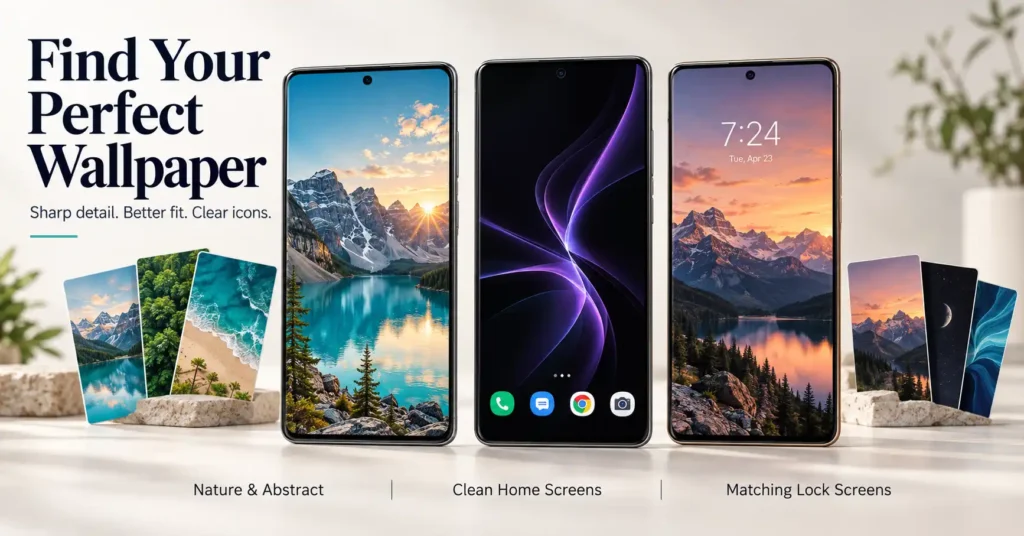
Searching for wallpapers for phone 4k can bring up thousands of colourful backgrounds. However, finding one that looks good on your actual phone takes more than choosing the sharpest preview.
A beautiful picture can lose its main subject when your phone crops it. A detailed background can make app names difficult to read. Even a high-resolution download may look disappointing if the original image was blurry or heavily compressed.
QHD Wallpapers 4K & HD, developed by Android Station, offers themed backgrounds, matching wallpaper pairs, and automatic changes. These features may be useful if you regularly refresh your phone’s appearance. But before installing another app, it helps to understand what your screen needs—and what your phone can already do.
Quick Answer
Table of Contents
Choose a wallpaper that matches your phone’s shape, looks sharp after cropping, and keeps clocks and icons readable. A 4K label alone does not guarantee a better result.
QHD Wallpapers is worth considering for people who enjoy browsing collections and changing backgrounds regularly. It includes ads and in-app purchases. If you only want one static background, your phone’s built-in wallpaper picker may be enough.
Quick Overview
| Question | What to know |
|---|---|
| What is the app? | QHD Wallpapers 4K & HD by Android Station |
| What does it offer? | Wallpaper collections, matching pairs, and automatic changes |
| Does it include ads? | Yes |
| Are paid options available? | Yes, through in-app purchases |
| Do you need a 4K screen? | No, but the image will be resized for your display |
| Who may find it useful? | People who frequently change their phone’s appearance |
| What should you check first? | Cropping, readability, purchase terms, and privacy information |
Why a 4K Wallpaper Can Still Look Wrong
Resolution describes the number of pixels in an image. It does not tell you whether the picture suits your screen.
Three things matter together:
- Dimensions: Whether the image has enough detail for your display.
- Shape: Whether its width and height match your phone.
- Composition: Whether important details remain visible behind your interface.
For example, a wide landscape picture may contain millions of pixels, but a tall phone screen can show only a narrow section when filling the display. Mountains at the edges or people standing away from the centre may disappear.
A portrait image with fewer total pixels can sometimes produce a better result because it needs less cropping.
Choose the right shape before chasing the highest resolution.
Check the downloaded file, not just the preview
A small preview can hide blurry edges, rough textures, and heavy compression.
After downloading, open the image in your gallery. Look at fine details and smooth areas such as skies. If the image already looks soft or uneven there, applying it as wallpaper will not restore the missing detail.
Also, avoid assuming that a large file is always better. Simple artwork can stay sharp in a relatively small download.
What QHD Wallpapers Offers in Everyday Use
The developer describes collections covering nature, anime, abstract designs, dark backgrounds, animals, and other themes.
A large selection is useful when it helps you find something suitable quickly. The more important question is whether the app’s extra features match how you use your phone.
Matching home and lock screen backgrounds
The advertised double-wallpaper feature offers coordinated pairs.
This is useful because your home screen and lock screen have different needs. A lock screen may have a large clock and several notification cards. A home screen contains app labels, folders, and widgets.
Try using a detailed picture on the lock screen and a simpler matching background on the home screen. They can share the same colours without showing exactly the same image.
Automatic wallpaper changes
The developer says the app can rotate wallpapers from a saved collection, with intervals starting at 15 minutes.
This may suit someone who enjoys variety without browsing for a new image every day. However, not every background will work equally well behind the same icons.
Build a small collection with similar brightness and clear areas around your widgets. Start with a longer interval and check whether the changes are useful or distracting.
Backgrounds that change through the day
The advertised all-day feature changes wallpapers as the day progresses.
That could provide a bright morning scene and a quieter evening background. However, it should not be confused with a promise of moving video, live weather, or interactive effects.
Check the feature inside the app if those effects are important to you.
Small wallpaper downloads
The developer says most wallpapers are under 1 MB.
That may make individual images convenient to save, but it does not describe total app data use. Previews, advertising, and repeated browsing can add to the amount downloaded.
If mobile data matters to you, check the app’s usage in Android settings after a few days.
The Wallpaper Details People Often Overlook
Leave room for notifications
A clean lock-screen preview may look very different once messages arrive.
Choose a picture whose main subject remains visible when notification cards appear. Avoid placing a face or important detail directly behind the clock.
Test your busiest home screen
Do not judge a wallpaper only on an empty home page.
Open the page with your most-used apps and widgets. If labels are difficult to read, choose a quieter image or one with fewer bright details behind them.
Keep important details away from the edges
Different launchers and wallpaper settings can frame the same image differently. Some backgrounds may also move as you swipe between home pages.
Leave space around the main subject instead of choosing an image that depends on every edge staying visible.
Separate visual quality from file size
A small file may contain a clear, simple illustration. A much larger file may still contain a blurry source image.
Check what you can actually see. File size alone cannot tell you whether a wallpaper is worth keeping.
Limitations to Know Before Installing
Screen fitting needs a real-device check
The developer advertises wallpapers that fit without cropping. Treat this as a feature to test on your own phone.
You May Also Like
 Style Wallpapers 4K HD for Mobile 2026 – Best HD & Ultra Wallpapers for Android: Are These Apps Worth Using?
 3D Fish Tank Live Wallpaper for Android 2026: Cute Fish Screen Is It Worth Using?
 HD Special Wallpapers Generator App for Android 2026 – What It Does and Whether It Is Worth Using
 3D Glitter Live Shining Wallpapers App for Android 2026 – What It Does and Why People Use It
When the image and screen have different proportions, filling the screen normally requires some adjustment. The result may involve cropping, borders, or a differently prepared image.
Always check the final home and lock screens after applying a background.
Ads can interrupt browsing
QHD Wallpapers includes advertising. How much that affects your experience depends on how you use the app and the ads shown.
Try the free experience before deciding whether a paid option is worthwhile.
Purchase terms need checking
The app offers in-app purchases, but current local prices and the exact scope of each purchase are not confirmed here.
Read the payment screen carefully. Check whether the offer removes ads, unlocks a collection, or provides other benefits. Also check whether it is a one-time payment or a recurring charge.
Automatic changes may not suit everyone
Scheduled rotation introduces another feature to manage. If you prefer a consistent screen or rarely change wallpapers, it may add little value.
This article does not claim measured battery savings, low memory use, or guaranteed rotation reliability.
Downloads do not automatically include reuse rights
Saving a wallpaper for your phone does not automatically give you permission to sell it, publish it on a website, or include it in your own template collection.
Check the relevant licence before using an image beyond a personal background.
Safety and Privacy Considerations
The app’s Google Play Data safety section says it may collect and share app activity, app information and performance, and device or other identifiers. These declarations come from the developer and are not an independent security audit.
There is also a detail worth checking: Google Play states that data cannot be deleted, while the linked developer policy describes a deletion-request process for information held by the developer. The public wording does not clearly explain how these statements fit together.
If this matters to you, contact support@androidstation.info before using the app.
For a clearer explanation of these disclosures, read Google’s guide to understanding an app’s Data safety information.
Before granting a permission, consider which feature needs it. This article does not confirm a complete permission list for the current app version.
Try This One-Minute Wallpaper Check
Before downloading a large collection:
- Save one wallpaper that matches your phone’s portrait shape.
- Open it in your gallery and inspect the image.
- Apply it to the home screen.
- Check app names and widgets at your normal brightness.
- Apply it to the lock screen and check the clock position.
- Swipe between home pages to look for unexpected cropping.
If the picture fails one of these checks, try another image before changing several phone settings.
When Your Phone’s Built-In Options Are Better
You may not need a separate app if you already have a favourite photo or only change backgrounds occasionally.
Built-in wallpaper settings are a sensible starting point for:
- Applying one personal photograph.
- Choosing a simple preset background.
- Setting different images for the home and lock screens.
- Avoiding another wallpaper app with ads and additional data practices.
Google’s instructions explain how to change wallpaper on a Pixel phone, including using photos and previewing the result. Other Android brands may use different menu names.
| Your main need | Best starting point | Main trade-off |
|---|---|---|
| Frequent themed changes | QHD Wallpapers | Ads, paid options, and privacy considerations |
| One permanent background | Built-in wallpaper picker | Fewer ready-made collections |
| A personal image | Your own photograph | May need careful positioning |
| Clear icons and widgets | A simple preset or quiet image | Less visual detail |
Who Should Avoid This App?
Consider another option if you want an entirely ad-free experience without paying, prefer to avoid its declared data practices, or only need one static wallpaper.
It may also be unsuitable if your main goal is a specific animated effect that the current listing does not clearly confirm.
How to Uninstall QHD Wallpapers
First, apply a replacement background through your phone’s built-in wallpaper settings.
Then open Settings → Apps → QHD Wallpapers → Uninstall. The wording may differ on your phone.
Automatic wallpaper changes supplied by the app will stop. If you also want to remove saved images, check your gallery or Downloads folder separately.
Frequently Asked Questions
Do I need a 4K phone screen to use 4K wallpapers?
No. Your phone can resize the image for its display. A high-resolution source may provide room for cropping, but it cannot increase the screen’s physical resolution.
Why does my wallpaper look blurry after applying it?
Possible causes include a low-quality source, heavy compression, or excessive enlargement. Check the downloaded image first, then compare how it looks after applying it.
Is QHD Wallpapers completely free?
The listing includes ads and in-app purchases. Do not assume that every collection or feature is available without payment.
Can a wallpaper under 1 MB still look sharp?
Yes. Simple images can compress efficiently. Check the image dimensions and visible detail rather than relying only on file size.
Does automatic wallpaper rotation need internet access?
The developer describes rotation from saved wallpapers. However, that does not establish that every app feature works offline. Browsing new images and loading other online content may still use data.
Can I use different home and lock screen wallpapers?
Many Android phones support this. Look for separate home-screen and lock-screen choices when applying the image. Available controls vary by device.
Will the wallpaper stay after uninstalling the app?
A static background already applied through Android may remain, but behaviour can vary with the wallpaper method used. Save a copy and apply it through your phone’s built-in settings if you want a more predictable result.
Final Recommendation
When choosing wallpapers for phone 4k, focus on screen fit, clean detail, and readability before resolution labels.
QHD Wallpapers is worth considering if you regularly browse themed collections or want matching backgrounds and automatic changes. Its main trade-offs are ads, paid options, and privacy considerations.
Start with one image and test it on both screens. If you simply want a clear, lasting background, your phone’s built-in wallpaper picker may already provide everything you need.
Editorial disclosure: TNShorts publishes independent Android app guides, comparisons, and educational content. This article is based on publicly available information and user-focused analysis, not a hands-on performance or security test. Features, pricing, permissions, privacy practices, and availability may change. Verify important details through official developer sources before making a decision.
More Articles You May Like
 3D Color Touch Live Wallpaper App for Android 2026 – What It Does and Why Users Install It
 Ripple Touch Magic & 3D Live Wallpaper Android App 2026 – What It Does and Why Users Install It
 COOL Wallpapers 4K HD Background Apps Android 2026 Guide – Why Users Install Them
![How Fish Live Wallpaper 3D Apps Work on Android in 2026 [BEAUTIFUL FISH]](https://tnshorts.com/wp-content/uploads/2026/03/Fish-Live-Wallpaper-3D-Apps-Android-2026-300x200.webp "How Fish Live Wallpaper 3D Apps Work on Android in 2026 [BEAUTIFUL FISH] 8") How Fish Live Wallpaper 3D Apps Work on Android in 2026 [BEAUTIFUL FISH]
How Fish Live Wallpaper 3D Apps Work on Android in 2026 [BEAUTIFUL FISH]