
Quick Answer
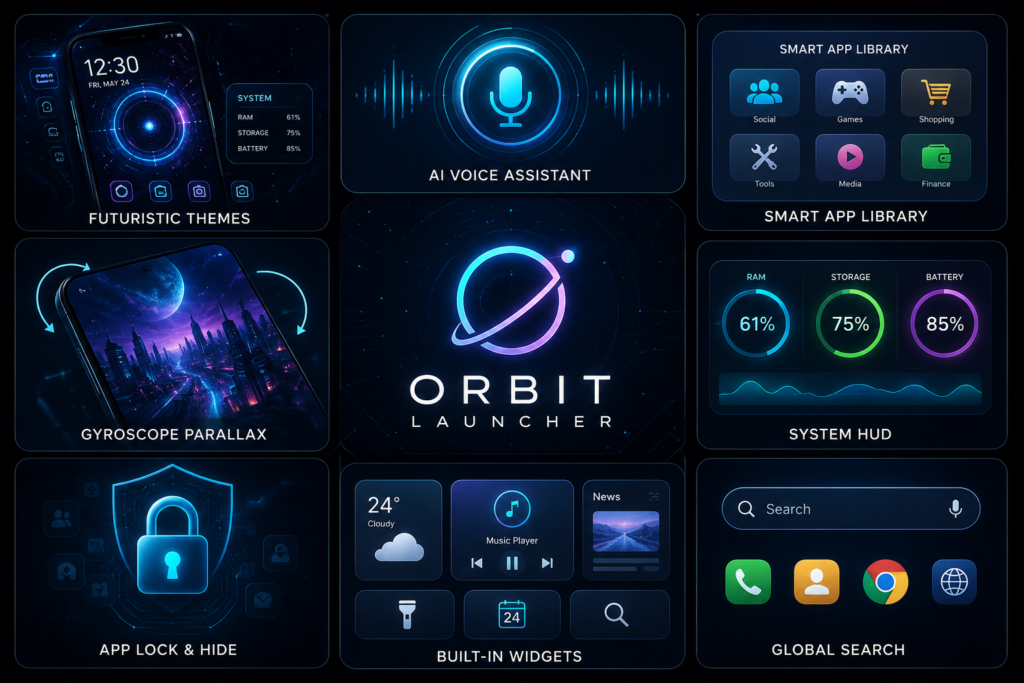
Orbit Launcher Sci-fi AI Theme is designed for Android users who enjoy extensive home screen customization, futuristic visuals, and built-in productivity tools. It offers far more than a traditional launcher, but its visual effects and extra features may not suit users who prefer a lightweight, minimal Android experience.
Why People Search for Orbit Launcher
Most people searching for Orbit Launcher aren’t simply looking for another launcher.
They’re usually asking one of these questions:
- Can I make my Android phone look completely different?
- Is there a launcher that feels modern instead of outdated?
- Can I organize hundreds of apps more efficiently?
- Does an AI-powered launcher actually improve daily use?
- Will it slow down my phone?
Those are the questions that matter more than a long list of features.
Table of Contents
What Most Users Want to Know
Is Orbit Launcher only about appearance?
No.
While its futuristic HUD interface is the biggest attraction, Orbit also combines organization, widgets, search, privacy tools, and AI-assisted shortcuts into one launcher.
For some users, that means replacing several separate apps.
Is it difficult to learn?
It depends.
If you’ve only used the default launcher from Samsung, Xiaomi, Motorola, or Pixel, Orbit may initially feel busy because it presents much more information on the home screen.
Users who enjoy customizing every detail usually adapt quickly.
Minimalist users may prefer something simpler.
What Orbit Launcher Actually Does
Orbit replaces your default Android home screen.
Instead of simply changing icons, it changes how you interact with your phone.
Examples include:
- Organizing apps automatically into categories
- Searching apps, contacts, and web results from one place
- Displaying system information like battery or storage directly on the home screen
- Supporting third-party widgets and icon packs
- Offering AI-assisted voice interactions (where supported)
Think of it as changing both the appearance and workflow of your phone rather than installing another wallpaper app.
Features That Matter in Everyday Use
AI Voice Assistant
Rather than opening multiple apps manually, voice commands can help launch apps, read news, or perform supported actions.
Where it helps:
- Driving
- Cooking
- Working hands-free
Where it may not:
- Noisy environments
- Users who rarely use voice assistants
The value depends more on your habits than the technology itself.
Smart App Library
Many people install dozens or even hundreds of apps over time.
Finding one quickly becomes frustrating.
Automatic categorization reduces scrolling and can make rarely used apps easier to locate.
This is especially useful for users who don’t spend time organizing folders manually.
HUD System Dashboard
Showing battery, RAM, and storage information on the home screen sounds impressive.
But here’s something many reviews overlook:
Not everyone needs to monitor RAM constantly.
If you’re the kind of user who never checks device performance, this dashboard may become visual clutter rather than useful information.
Power users benefit the most.
Parallax Wallpapers
The motion-based wallpaper creates a sense of depth as you move your phone.
It looks impressive during demonstrations.
However, users who prioritize battery life over visual effects may prefer static wallpapers.
The experience is more about enjoyment than productivity.
Built-in Privacy Tools
App hiding and app locking reduce the need for installing separate privacy utilities.
This is convenient if you occasionally hand your phone to friends, family, or children.
Remember that launcher-based hiding isn’t the same as operating system-level security.
Sensitive information should still rely on Android’s own security features.
A Detail Most Reviews Ignore
Many launcher reviews compare features.
Very few discuss decision fatigue.
A launcher offering hundreds of settings sounds great until you need to configure them.
Ask yourself:
Do you enjoy customizing your phone, or do you simply want it to work?
You May Also Like
![Epic Themes Launcher App 2026 [ELEGANT THEMES]: Is It Worth Trying for Android Customization?](https://tnshorts.com/wp-content/uploads/2026/05/epic-themes-launcher-app-2026-300x225.png "Epic Themes Launcher App 2026 [ELEGANT THEMES]: Is It Worth Trying for Android Customization? 3")
If customization itself feels like a hobby, Orbit becomes enjoyable.
If changing icons already feels like too much work, many advanced options may never be used.
The best launcher isn’t necessarily the one with the most features.
It’s the one you’ll actually keep using after two weeks.
Real-World Use Cases
Orbit may suit users who:
- Enjoy futuristic or cyberpunk aesthetics
- Frequently personalize Android devices
- Install many apps
- Like experimenting with widgets
- Want multiple tools integrated into one launcher
It may be less useful for:
- Elderly users wanting a simple interface
- Children using shared devices
- Users who rarely customize anything
- Phones with limited hardware resources
Benefits
- Highly customizable home screen
- Supports third-party icon packs
- Combines several utilities into one launcher
- Smart app organization
- Modern visual design
- Global search improves accessibility
- App lock and hiding features add convenience
- Can reduce dependence on multiple separate customization apps
Limitations
No launcher is perfect.
Consider these trade-offs:
- Learning curve for first-time users
- Advanced visuals may not appeal to everyone
- Heavy customization can take time
- Some features depend on Android version or device compatibility
- Certain gesture features require Accessibility Service permissions
- Visual effects may have a greater impact on older or lower-end devices than on newer hardware
Things to Know Before Installing
Before switching launchers:
- Download it from the official Google Play Store.
- Some advanced features may require additional permissions.
- Accessibility Service is used for gesture-related functions according to the developer.
- If you already use another launcher, you may need to set Orbit as your default launcher.
- Existing widgets or icon layouts from your current launcher may not transfer automatically.
A practical tip: take screenshots of your current home screen before switching. If you decide to return later, rebuilding your layout becomes much easier.
Safety & Privacy Considerations
Based on the developer’s published information:
- The app is available through the official Google Play Store.
- The developer states that personal data is not collected or sold.
- Accessibility permissions are described as supporting gesture shortcuts such as double-tap to lock or screenshots.
As with any launcher:
- Review requested permissions during installation.
- Read the current privacy policy on the Play Store.
- Recheck permissions after major updates, since app functionality can evolve over time.
Avoid assuming any app is permanently “safe”—it’s good practice to review changes whenever an app receives significant updates.
Who Should Use Orbit Launcher?
Orbit is a strong fit for:
- Android enthusiasts
- Users who enjoy personalization
- People who like futuristic interfaces
- Users managing many installed apps
- Anyone wanting an all-in-one launcher instead of multiple customization apps
Who Should Avoid It?
You may want another launcher if you:
- Prefer Google’s stock Android appearance
- Want maximum battery efficiency
- Dislike spending time customizing settings
- Only need larger icons or a simpler layout
- Use an entry-level phone where lightweight launchers generally provide a smoother experience
Better Alternatives
Nova Launcher
Best for: Balanced customization
Strengths
- Mature customization options
- Clean interface
- Reliable performance
Trade-off
- Doesn’t emphasize futuristic visuals.
Niagara Launcher
Best for: Minimalists
Strengths
- Extremely simple
- Fast navigation
- Less visual clutter
Trade-off
- Much fewer visual customization options.
Microsoft Launcher
Best for: Productivity
Strengths
- Microsoft account integration
- Calendar and task features
- Professional workflow
Trade-off
- Less focused on visual themes.
Smart Launcher
Best for: Automatic organization
Strengths
- Intelligent app categorization
- Easy setup
- Clean interface
Trade-off
- Different design philosophy compared to Orbit’s sci-fi style.
Final Recommendation
Orbit Launcher Sci-fi AI Theme isn’t simply trying to make Android look futuristic—it aims to change how users interact with their phones through customization, organization, and integrated tools.
Its biggest strength is combining multiple functions that many users normally install as separate apps. That can create a more unified experience for people who enjoy personalization.
Its biggest limitation is complexity. If your ideal launcher is one you never have to think about, Orbit may feel excessive.
Choose Orbit Launcher if:
- You enjoy customizing your Android device.
- You like futuristic interfaces.
- You want an all-in-one launcher experience.
- You regularly experiment with themes and widgets.
Consider alternatives if:
- You prefer a clean, lightweight interface.
- Battery efficiency is your top priority.
- You rarely customize your home screen.
For users who enjoy turning Android into a personalized workspace rather than simply changing wallpapers, Orbit is worth exploring from the official Google Play listing.
Frequently Asked Questions
1. Does Orbit Launcher replace my phone’s original launcher?
Yes. After setting it as the default launcher, it becomes your primary home screen. You can switch back to your previous launcher anytime through Android settings.
2. Will Orbit Launcher make my phone faster?
A launcher mainly changes the interface rather than your phone’s hardware performance. Smoothness depends on your device specifications, Android version, and the features you enable.
3. Can I use my existing icon packs?
According to the developer, Orbit supports major third-party icon packs, allowing you to keep your preferred icon style.
4. Does Orbit Launcher work without using the AI features?
Yes. You can use the launcher for its customization and organization features even if you don’t rely on AI voice assistance.
5. Is Accessibility Service required?
Only certain gesture-based features are reported to use Accessibility Service. If you don’t use those features, review the permission prompts to understand what is required on your device.
6. Can I hide apps with Orbit Launcher?
The developer states that app hiding and app locking features are included, providing an additional layer of convenience for organizing or limiting access to apps.
7. Is Orbit Launcher suitable for beginners?
It depends on your preferences. Users who enjoy exploring settings will likely appreciate it, while those seeking a simple “install and forget” experience may prefer a lighter launcher.
Editorial Disclosure
TNShorts publishes independent Android app reviews, guides, comparisons, and educational content.
This article is based on publicly available information, practical analysis, and a user-focused evaluation of the app’s intended functionality. Features, permissions, privacy practices, pricing, and availability may change over time. Always verify the latest information through the official Google Play Store listing and the developer’s documentation before installing or relying on any app.
More Articles You May Like
 Tree Launcher App for Android 2026 – Features, Benefits & Safe Alternatives
 SpaceWalker Space Theme Launcher App for Android 2026 – What It Does and Why Users Install It
 What Is New CMM Launcher Apps on Android (ULTIMATE LAUNCHER 2026)?
![What Is ChromaFusion Launcher Apps for Android 2026? [STYLE SCREEN]](https://tnshorts.com/wp-content/uploads/2026/02/ChromaFusion-Launcher-App-300x200.webp "What Is ChromaFusion Launcher Apps for Android 2026? [STYLE SCREEN] 8") What Is ChromaFusion Launcher Apps for Android 2026? [STYLE SCREEN]
What Is ChromaFusion Launcher Apps for Android 2026? [STYLE SCREEN]