
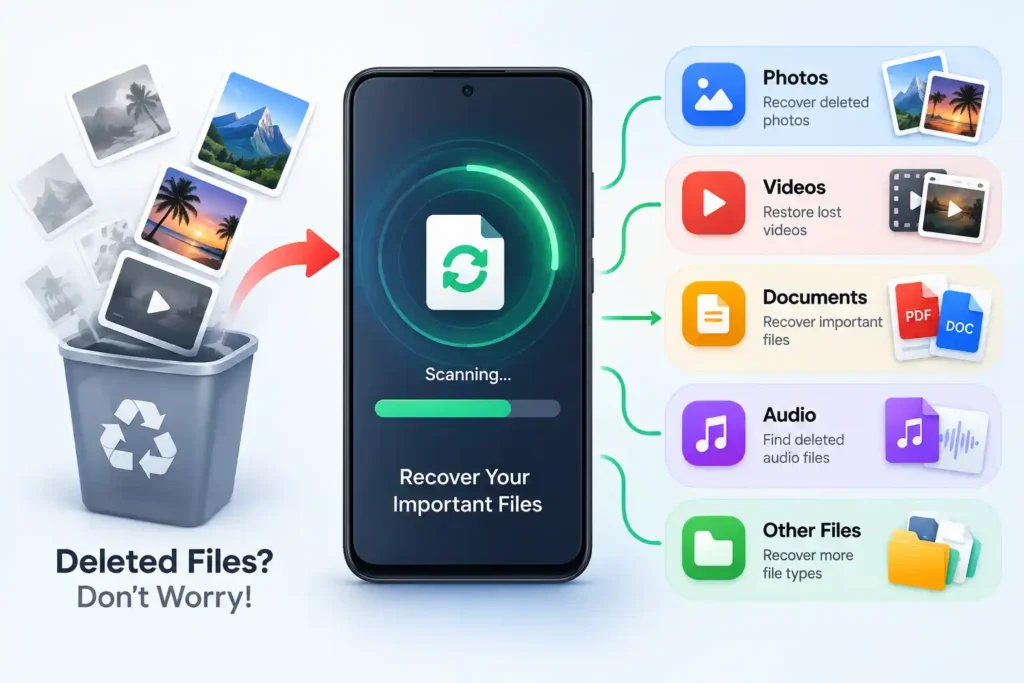
Accidentally deleting an important photo, family video, PDF, or downloaded document can create instant panic. The first reaction is often to search Google Play for a Mobile Files Recovery app and start scanning the phone.
But there is something more important to understand first: a recovery app cannot guarantee that a permanently deleted Android file is still recoverable.
Photo Recovery & File Recovery, published on Google Play under Wolf Kan, offers photo, video, document and other file recovery features, including Quick Scan and Deep Scan. The developer also explicitly states that permanently deleted files are not guaranteed to be recovered.
That limitation matters more than any long feature list.
Quick Answer
Photo Recovery & File Recovery may be worth trying when you cannot find a deleted photo, video or file through Android’s normal Trash or backup options. But don’t install it expecting guaranteed recovery.
Try the phone’s Gallery Trash, Google Photos Trash, Files/Recycle Bin and any cloud backup first. If the missing file is extremely important, minimize new activity on the phone before doing anything else.
The app is officially available through Google Play, contains ads and in-app purchases, and its Play listing says recovery success varies according to the condition of the device.
Table of Contents
The Most Important Thing To Do Before File Recovery
If you have just deleted an important file, don’t immediately fill the phone with new data.
Avoid, where practical:
- recording several new videos,
- downloading large files,
- installing many apps,
- running storage-cleaning tools,
- copying gigabytes of data to the phone.
Why?
Deleted data and free storage are not the same thing as a file sitting safely in a hidden folder. Storage may eventually be reused, and Android devices use flash-storage maintenance mechanisms such as TRIM.
There is an overlooked trade-off here: installing a recovery app is itself a write operation.
That does not mean installing this app will automatically destroy your deleted photo. It means that if the lost data is genuinely irreplaceable, blindly installing five different recovery apps one after another is not a sensible first step.
Before Installing Any Recovery App, Check These Places
A file that appears to be “deleted” may still be recoverable without performing a storage scan.
First check the Trash, Bin or Recently Deleted section of the app that originally managed the file. For photos, check both your phone’s Gallery and any photo backup service you use. For documents, check your file manager’s Trash and relevant cloud storage.
Also check whether the file exists on another device, an SD card, WhatsApp/Telegram conversation, email attachment, computer backup or cloud account.
This approach has an important advantage: restoring an existing Trash or backup copy is fundamentally different from trying to reconstruct a permanently deleted file.
So TNShorts recommends exhausting those options first.
What Is Photo Recovery & File Recovery?
Photo Recovery & File Recovery is an Android Tools app published under Wolf Kan.
At the time of our September 2026 check, its Google Play listing showed 10M+ downloads, an Everyone content rating, ads and in-app purchases. The listing was updated in August 2026. These Play Store figures can change over time.
The app advertises recovery for:
Photos and videos — scans for media that may be available for recovery.
Documents and other files — expands the search beyond pictures.
Quick Scan — intended for a faster initial search.
Deep Scan — performs a more extensive search.
Selective Recovery — lets users choose the discovered items they actually want to restore.
Recovered-file management — helps organize files found or restored by the app.
The developer also says the recovery process can work without rooting the phone.
“Deep Scan” Does Not Mean Guaranteed Deep Recovery
This distinction is particularly important.
A button labelled Deep Scan can easily give users the impression that an app has unrestricted access to every deleted storage block on the device.
Modern Android does not work that simply.
Android 11 and newer versions enforce scoped-storage rules that restrict how apps access files belonging to other apps and different storage locations.
Therefore, users should treat “Deep Scan” as the name of the app’s more extensive scanning mode—not as proof of forensic-level access to every previously deleted byte on the phone.
This also explains why two people using the same recovery app can get completely different results.
Why Can a Recovery App Show Photos That Were Never Deleted?
This is another detail worth understanding before judging scan results.
A storage scan may discover accessible images, thumbnails, cached copies or media that is still present somewhere on the device. Finding an image during a scan does not automatically prove that the app reconstructed a permanently deleted original.
This distinction matters because some Google Play reviewers reported that scans showed existing gallery content rather than the deleted files they expected to recover. Those are individual user reports, not proof that everyone will have the same experience, but they demonstrate why users should inspect results carefully.
A useful test is simple:
Can you open the recovered item at the expected resolution and verify that it is actually the missing file?
A thumbnail appearing in search results is less valuable than a usable original file.
What This App Gets Right
The biggest advantage is convenience.
Someone who has already checked normal Trash and backup locations can perform a recovery-oriented scan from the phone instead of immediately moving to complicated desktop tools.
Selective recovery is also useful. If a scan discovers hundreds of images, restoring everything would create another storage-management problem. Being able to choose specific results makes more sense.
The no-root approach is another practical benefit for ordinary Android users. Rooting a phone solely to recover a few files can introduce significant complexity and is not something most users should casually attempt.
Most importantly, the developer does not promise that every permanently deleted file will come back. The Google Play description explicitly acknowledges that results can vary.
Limitations You Should Know
The main limitation is straightforward:
There may be nothing left for the app to recover.
Recovery can be affected by where the file was stored, how it was deleted, how much the phone has been used since deletion, Android’s storage restrictions and whether another copy or thumbnail still exists.
There are also user-experience considerations. The official Play listing confirms that the app contains ads and in-app purchases.
Some Play Store reviews complain about frequent advertising or failing to find the expected deleted files. Reviews represent individual experiences rather than controlled testing, so they should not be treated as universal results. However, they are useful when setting realistic expectations.
Things To Know Before Installing
Before tapping Install, answer one question:
How valuable is the missing file?
If it is an ordinary photo that would be nice to recover, trying a reputable Play Store recovery tool after checking Trash and backups is reasonable.
You May Also Like
![Permanently Delete Photo Recovery App for Android 2026 – What It Really Does [SUDDEN RECOVER]](https://tnshorts.com/wp-content/uploads/2026/04/Permanently-Delete-Photo-Recovery-App-Android-2026-300x200.webp "Permanently Delete Photo Recovery App for Android 2026 – What It Really Does [SUDDEN RECOVER] 4")
If it is the only copy of an irreplaceable wedding video, legal document or important work file, the decision is different. Repeatedly installing recovery apps, running cleaners and continuing normal heavy phone usage may not be the best strategy.
Also review any storage or media permissions the app requests. A recovery utility logically needs access to files it is expected to search, but users should still read Android’s permission prompts rather than approving everything automatically.
Safety and Privacy: A Detail Worth Checking
The app’s Google Play page provides a useful privacy distinction.
The developer’s Play Data safety declaration says no data is collected, while also stating that app activity and device or other IDs may be shared with third parties. It also says data is encrypted in transit. These declarations are supplied by the developer and may change.
Meanwhile, the app description says its recovery processes are performed locally.
Those statements should not be simplified into “100% private” or “completely safe.”
For a recovery application, this distinction is especially important because users may be scanning personal photos and documents. Review the current Google Play Data safety section and the app’s permission requests before proceeding.
A Better Mobile Files Recovery Order
Instead of beginning with a random recovery scan, TNShorts recommends this order:
1. Stop unnecessary storage activity.
Don’t create or download lots of new data if the missing file matters.
2. Check the original app’s Trash or Recently Deleted folder.
This gives you the easiest recovery path.
3. Check backups and other copies.
Look at photo backups, cloud drives, SD cards, chats, email attachments and computers.
4. Search the phone normally.
The file may have been moved or renamed rather than deleted.
5. Only then consider a recovery app.
Use the official Google Play version and start with the least disruptive scan available.
6. Verify recovered files before celebrating.
Open them and confirm file quality, duration, size and content.
7. Save important recovered data somewhere else.
Once recovered, create another copy rather than relying on a single phone again.
This sequence is more useful than installing recovery apps first and asking questions later.
Who Should Try Photo Recovery & File Recovery?
It makes the most sense for users who:
have already checked Trash and backups, want a simple phone-based scan, understand that results are uncertain, and only want to recover selected photos, videos or documents.
For that type of user, the app is a reasonable option to investigate.
Who Should Avoid It?
Avoid treating this app as your only solution if the lost data is professionally or personally irreplaceable.
It is also a poor match for anyone expecting a guarantee such as:
“Recover every photo deleted six months ago.”
No responsible recovery recommendation can promise that.
Users who dislike ad-supported utilities should also note the Play Store’s ads and in-app-purchase labels before installing.
Better Alternatives — Depending on What Actually Happened
The best alternative may not be another recovery app at all.
For recently deleted photos: check Google Photos or the manufacturer’s Gallery Trash first. This is preferable when an undeleted Trash copy still exists.
For deleted documents: check your phone’s file-manager Trash and cloud storage before performing recovery scans.
For SD-card files: if the data is particularly valuable, a computer-based recovery workflow may sometimes be more appropriate than continuing to write data to the card.
For files lost after a factory reset: expectations should be much lower. Modern Android devices use storage encryption, and factory-reset mechanisms are specifically designed to remove user data.
In other words, don’t choose the recovery method based on which app has the biggest “Recover” button. Choose it based on how the file disappeared.
FAQs
Can Mobile Files Recovery restore permanently deleted photos?
Sometimes recoverable data or another accessible copy may be found, but permanent recovery is not guaranteed. Photo Recovery & File Recovery itself states this limitation on Google Play.
Should I install a recovery app immediately after deleting a file?
First check Trash and existing backups. If the file is extremely valuable, minimize unnecessary storage activity because installing apps and creating new files writes additional data to the device.
Does Photo Recovery & File Recovery require root?
Its Google Play description says recovery can be performed without rooting the device.
Why does the scan show photos already in my Gallery?
A scan can encounter media or other accessible copies that are still present on the device. A displayed image should not automatically be assumed to be a recovered permanently deleted original.
Can it recover deleted videos?
Video recovery is one of the capabilities advertised in its Google Play description, but successful recovery is not guaranteed.
Is Photo Recovery & File Recovery free?
It is available to install through Google Play, but the current listing says it contains ads and in-app purchases.
Is the app completely safe and private?
TNShorts does not label any third-party recovery app “completely safe.” Review its current permissions, Data safety information and privacy policy before allowing access to personal storage.
What should I do after successfully recovering a file?
Open it first to verify that it is complete, then make a second copy on trusted cloud storage, a computer or another backup location.
Final Recommendation
Photo Recovery & File Recovery is worth considering as a secondary recovery attempt—not as your first or guaranteed solution.
Its strengths are straightforward phone-based scanning, support for several file types, selective recovery and operation without requiring root according to its Play listing. Its biggest limitation is equally important: a permanently deleted file may simply be unrecoverable.
For most Android users, the smartest order is:
Trash → backup → normal file search → recovery scan.
If the lost data is extremely valuable, avoid experimenting with numerous recovery apps and creating unnecessary new data on the device.
That is a much safer decision than believing any “Deep Scan” label guarantees that deleted memories can be brought back.
Editorial Disclosure
TNShorts publishes independent Android app reviews, guides, comparisons and educational content. Content is based on publicly available information, practical analysis and user-focused evaluation.
Features, pricing, permissions, privacy practices and availability may change over time. Readers should verify important information through official developer sources before making decisions.
More Articles You May Like
![Photo Recover Apps on Android in 2026 – What They Do and When They Work [GET BACK PHOTOS]](https://tnshorts.com/wp-content/uploads/2026/03/Photo-Recover-Apps-on-Android-in-2026-300x167.jpg "Photo Recover Apps on Android in 2026 – What They Do and When They Work [GET BACK PHOTOS] 5") Photo Recover Apps on Android in 2026 – What They Do and When They Work [GET BACK PHOTOS]
Photo Recover Apps on Android in 2026 – What They Do and When They Work [GET BACK PHOTOS]
 Deleted Photos Recovery App 2026 – Complete Guide Before You Use (All Recover Updated)
 🗞️ Recover Deleted Photos App 2025 — The Ultimate Photo & Video Recovery Tool by DOSA Apps
 Restore Deleted Old Photos – Best Android Photo Recovery App 2025