
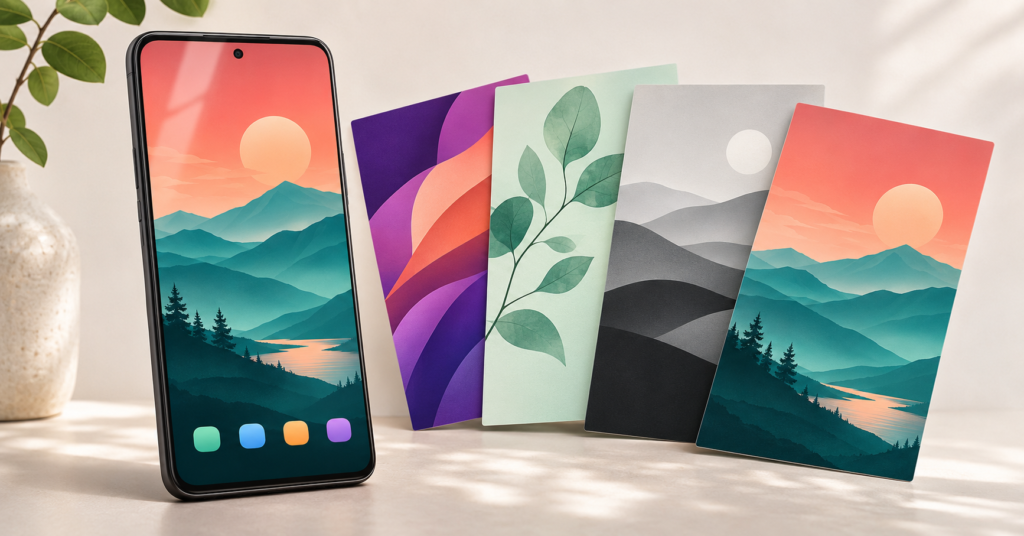
Quick Answer
WalliPop Wallpapers is a paid Android app from ArrowWalls that offers illustrated backgrounds for your home and lock screens. It may suit users who enjoy colourful, artistic phone designs. Before buying, check the current download feature, purchase details, and privacy information: parts of its Google Play listing give conflicting information.
A good wallpaper should do more than look attractive in a preview. It should fit your screen, keep app labels readable, and work around your clock and widgets.
WalliPop’s appeal is its collection of illustrated designs. However, deciding whether to buy it involves more than comparing wallpaper counts or looking for a “4K” label. The more useful question is whether you can find backgrounds you will actually enjoy using—and whether the app lets you apply and save them in the way you expect.
This guide explains what to check before paying, how to judge a wallpaper on your own phone, and where the available information needs clarification.
WalliPop Wallpapers: Quick Overview
| Detail | What to know |
|---|---|
| App | WalliPop Wallpapers |
| Developer | ArrowWalls |
| Platform | Android |
| Main purpose | Artistic home-screen and lock-screen backgrounds |
| Pricing | Paid download; in-app purchases are also listed |
| Wallpaper saving | Release notes mention downloading, but the description still states a restriction |
| Artwork licence | Personal use; contact the developer about commercial use |
| Best suited to | Users who particularly like the collection’s visual style |
What Does WalliPop Offer?
WalliPop focuses on custom-designed wallpapers organised into categories. Its promotional screenshots show styles such as landscapes, abstract patterns, minimal designs, and grayscale artwork.
For users who regularly personalise their phones, browsing a collection with a consistent artistic style can be more convenient than searching through unrelated images.
However, the collection’s size is not the most useful measure of value. Several backgrounds that suit your taste may be worth more to you than hundreds you would never apply.
Before buying, examine the screenshots closely. Look for colours, compositions, and illustration styles you would want behind your everyday apps.
Can You Download WalliPop Wallpapers?
This is the most important detail to clarify.
The main Google Play description says users can apply wallpapers directly but cannot download or share them. However, the listing’s “What’s new” section says a download option has been added.
The description may not have been updated to reflect the newer feature. Still, the public information does not fully explain how saving works on every supported device.
If downloading is essential, ask the developer:
Does the current version save a full-resolution wallpaper that I can select through my phone’s own wallpaper settings?
Once installed, check whether a saved image appears in your gallery or file manager. Applying a wallpaper and saving an accessible image file are different actions.
This matters if you want to keep a favourite background, adjust it through another wallpaper picker, or use it again later.
Check How the Wallpaper Fits Your Actual Screen
A clean preview does not show everything that appears on your home screen.
Your phone adds app icons, labels, folders, widgets, and notification indicators. These can cover the artwork or make the screen feel crowded.
Keep app labels readable
A detailed illustration can look attractive by itself but compete with small text. Check whether you can quickly read the names of your most-used apps.
If you need to look more closely than usual, try a quieter background or a different crop.
Leave space for your widgets
Consider where your clock, weather widget, or calendar sits. A subject placed near the top of an image may disappear behind a large clock.
Choose a composition with open space where your widgets normally appear.
Test the home screen and lock screen separately
The same wallpaper may work differently on each screen.
A detailed image might suit a mostly empty lock screen, while a simpler design could work better behind several rows of apps. You do not need matching backgrounds if different images make each screen easier to use.
Does “4K” Mean Better Wallpaper Quality?
WalliPop advertises HD and 4K artwork, but resolution alone does not guarantee a good result.
Image proportions, cropping, and composition also matter. A wide image may need significant cropping to fill a tall phone screen. Even a sharp image can look awkward if its main subject is cut off.
After applying a wallpaper, check:
- Whether fine edges look clear at normal viewing distance.
- Whether the subject remains in a useful position.
- Whether moving between home-screen pages changes the crop.
- Whether the lock-screen clock covers an important detail.
These are practical checks to perform on your device, rather than results from a hands-on test of WalliPop.
What Should You Check Before Paying?
WalliPop has an upfront purchase price and is also marked as offering in-app purchases. Check the amount shown in your own Google Play account because prices can vary by region and over time.
Before buying, confirm what the initial payment includes. An in-app purchase label does not explain whether additional purchases are optional extras or affect access to content you want.
Also, judge the collection available now. The description promises regular additions, but that should not be your only reason for purchasing.
A useful approach is to identify several wallpapers you would genuinely use before deciding whether the app offers value.
You May Also Like
 Style Wallpapers 4K HD for Mobile 2026 – Best HD & Ultra Wallpapers for Android: Are These Apps Worth Using?
 3D Fish Tank Live Wallpaper for Android 2026: Cute Fish Screen Is It Worth Using?
 HD Special Wallpapers Generator App for Android 2026 – What It Does and Whether It Is Worth Using
 3D Glitter Live Shining Wallpapers App for Android 2026 – What It Does and Why People Use It
Do not assume refunds are automatic
The developer advertises a refund offer in the description. Clarify its conditions if that promise affects your decision.
Google Play refund eligibility depends on factors including what you bought, when you paid, and your location. Keep your purchase receipt and contact the relevant support channel promptly if something does not work.
Privacy Information Needs Clarification
The Google Play Data safety section declares no data collection or third-party sharing.
However, the linked privacy policy says certain personal information, device information, and usage statistics may be collected. It also mentions notification services. The wording is broad and does not clearly explain which practices apply specifically to WalliPop.
These disclosures do not provide a consistent picture. This is a reason to ask for clarification, rather than evidence that the app is harmful.
Before granting permissions:
- Read the policy currently linked from the store listing.
- Check the explanation for each permission request.
- Ask why access is needed if its purpose is unclear.
- Avoid supplying optional personal information unless you understand how it will be used.
The description also references older Android storage permissions. That wording alone does not establish which permission prompts will appear on your particular phone.
Personal Use Does Not Include Every Use
The developer states that WalliPop artwork is for personal use and asks users to contact them about commercial use.
Using an image as your phone background is different from placing it on a website, redistributing it in a wallpaper collection, or printing it on products.
A download feature does not automatically grant wider rights to the artwork. If you create content or run a business, obtain permission before using a wallpaper beyond its stated licence.
Limitations to Consider
The main limitation is unclear documentation around downloading and privacy.
Other details—including offline catalogue access, exact saved-image dimensions, and the scope of additional purchases—were not established by the public information reviewed for this guide.
There are also practical considerations:
- Some designs may require an awkward crop on your screen.
- Detailed artwork may make labels and widgets harder to read.
- Your favourite style may represent only a small part of the collection.
- Future additions may not match your preferences.
If any unconfirmed feature is essential, ask about it before paying.
Who Should Use WalliPop?
WalliPop may suit you if you enjoy its illustration style, regularly change your phone’s appearance, and can already identify several designs you would use.
It is less suitable if you need confirmed access to downloadable originals, commercial-use artwork, or completely clear privacy disclosures before installing.
| Your main need | Suggested next step |
|---|---|
| Artistic backgrounds that match your taste | Review the collection and purchase details |
| Wallpapers you can save and keep | Confirm the current download behaviour |
| A simpler-looking home screen | Try your phone’s included backgrounds first |
| Commercial artwork | Obtain explicit permission or choose appropriately licensed images |
| Clear privacy information | Ask the developer to explain the conflicting disclosures |
Alternatives Worth Considering
Your phone’s built-in wallpaper collection is a sensible starting point if you only want a cleaner appearance. It lets you explore available styles without buying another app.
Your own photographs are another option. You can choose a meaningful image and adjust its composition using the tools available on your phone.
A paid wallpaper collection becomes more appealing when its particular artwork offers something you cannot easily find among those existing choices.
How to Change Your Wallpaper or Uninstall WalliPop
To replace a wallpaper, open your phone’s wallpaper settings and choose an included background or an image you already have. The menu name varies by device.
To remove the app, open Settings → Apps → WalliPop Wallpapers → Uninstall, or use its Google Play page.
If you want to stop using its artwork, select a replacement wallpaper first. Do not rely on uninstalling the app to restore your previous background automatically.
Frequently Asked Questions
Is WalliPop a launcher?
WalliPop is a wallpaper app. It changes your background rather than replacing your app drawer, home-screen navigation, or icon system.
Can I save its wallpapers to my gallery?
The release notes announce a download option, but the description still contains an older restriction. Confirm how saving works in the current version if gallery access is important to you.
Is WalliPop free?
The listing shows a purchase price and also mentions in-app purchases. Check your regional Google Play page for the current amount and purchase details.
Will every wallpaper fit my screen perfectly?
Not necessarily. Your screen proportions and wallpaper settings can affect cropping. Preview each image with your usual icons and widgets visible.
Can I use the artwork on my website?
Do not assume the app purchase permits this. The stated licence is for personal use; contact the developer about other uses.
Is WalliPop completely safe?
This guide cannot establish that. It is not a security audit, and the available privacy disclosures need clarification. Review the current information and permission requests before deciding.
Final Recommendation
WalliPop Wallpapers is worth considering when its artwork closely matches your taste. Before buying, confirm the download feature, understand any additional purchases, and review the privacy information.
If your goal is simply to make your phone look cleaner, try its included backgrounds first. Buy WalliPop because you want its particular designs and have confirmed the features you need.
Check WalliPop Wallpapers on Google Play
Sources
Editorial disclosure: TNShorts publishes independent Android guides based on public information and practical editorial analysis. This article is not a hands-on review or security audit. Features, prices, permissions, and policies may change. Verify essential details through official sources before purchasing.
More Articles You May Like
 3D Color Touch Live Wallpaper App for Android 2026 – What It Does and Why Users Install It
 Ripple Touch Magic & 3D Live Wallpaper Android App 2026 – What It Does and Why Users Install It
 COOL Wallpapers 4K HD Background Apps Android 2026 Guide – Why Users Install Them
 How Fish Live Wallpaper 3D Apps Work on Android in 2026 [BEAUTIFUL FISH]