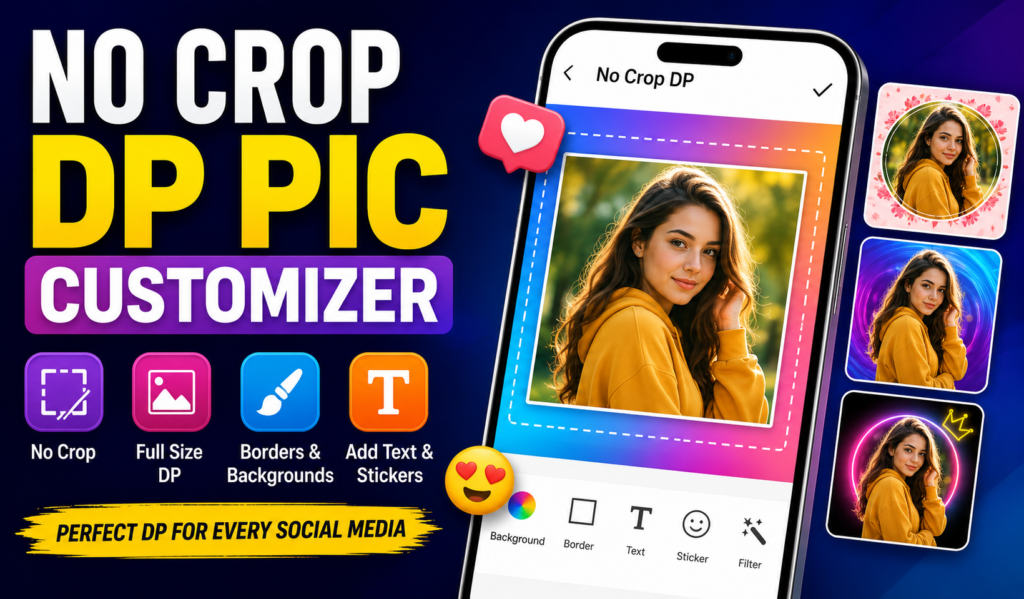
Welcome to the No Crop DP Pic Customizer support page. This guide helps Android users understand how the app works, how to create full-size profile pictures, common issues, troubleshooting steps, and frequently asked questions.
What Is No Crop DP Pic Customizer?
No Crop DP Pic Customizer is a photo editing and profile picture customization app designed to help users create full-size profile photos without cropping important parts of the image.
Many social media platforms use square profile picture formats. As a result, parts of a photo may be automatically cut off when uploaded. No Crop DP Pic Customizer helps solve this problem by fitting the entire image into a square layout while preserving the original photo.
What Can You Do With No Crop DP Pic Customizer?
The app provides several customization tools, including:
- No-crop profile picture creation
- Square photo fitting
- Photo borders and frames
- Blur background effects
- Color backgrounds
- Text customization
- Stickers and decorations
- Profile picture resizing
- Social media-ready image export
These features are designed to help users create profile photos that fit social platforms without losing image content.
How Do I Create a Full-Size Profile Picture?
Follow these steps:
Step 1
Open the app.
Step 2
Choose a photo from your gallery.
Step 3
Select the square-fit or no-crop option.
Step 4
Adjust the photo size and position.
Step 5
Add optional borders, backgrounds, stickers, or text.
Step 6
Save the final image.
Step 7
Upload the saved image as your profile picture.
The app automatically helps fit photos into square formats commonly used by social media platforms.
Why Is My Photo Still Getting Cropped?
Possible reasons include:
- Social media platform limitations
- Profile picture preview differences
- Incorrect image positioning
- Additional automatic cropping by the platform
Try leaving extra space around the subject before saving the final image.
Can I Add Background Colors?
Yes.
Many no-crop profile picture apps allow users to add:
- Solid colors
- Gradient colors
- Blur effects
- Pattern backgrounds
This helps fill empty areas created when fitting photos into square formats.
Can I Add Text to My Profile Picture?
Yes.
The app may allow users to:
- Add custom text
- Choose fonts
- Resize text
- Move text positions
- Create personalized profile images
Available options may vary by app version.
Why Is the Saved Image Low Quality?
If image quality appears lower than expected:
You May Also Like
 Full Crop PERFECT FULL Guide: WhatsApp DP Full Size Upload Without Cropping (2025)
 Set Full-Size DP on Android: Keep FULL PART of Your WhatsApp Profile Pic
 What is Play Store Set the Full DP App: Set Full Profile Pictures or Big DP Without Cropping on Android
 Create a Different DP: Unique Profile Pictures for WhatsApp with Custom Borders and AI Effects
- Use a higher-resolution original photo.
- Save using the highest available quality setting.
- Avoid repeatedly editing the same image.
- Make sure sufficient device storage is available.
Higher-quality source images usually produce better results.
Can I Use the App for WhatsApp, Facebook, and Instagram?
Yes.
No-crop profile picture apps are commonly used for:
- WhatsApp profile photos
- Facebook profile pictures
- Instagram profile images
- Telegram profile photos
- Other social media platforms
The square-fit feature is specifically designed for profile picture formats.
Why Is the App Not Saving My Image?
Possible reasons include:
- Storage permission disabled
- Low storage space
- Temporary app issue
- Outdated app version
Try the following:
- Restart the app.
- Check storage permissions.
- Free up storage space.
- Update the app.
- Restart your device.
Why Are Borders or Frames Missing?
Some designs may require:
- Downloading additional content
- Updated app version
- Internet connection
Refreshing the content section may resolve the issue.
Does No Crop DP Pic Customizer Require Internet?
Internet may be required for:
- Downloading new backgrounds
- Accessing online content
- Receiving updates
Most basic editing features generally work offline after installation.
Is No Crop DP Pic Customizer Safe?
Users should always download apps from trusted sources such as Google Play.
For better security:
- Review app permissions.
- Read privacy information.
- Keep Android updated.
- Install updates regularly.
Using official app stores helps reduce security risks.
Common Troubleshooting Solutions
App Crashes
- Restart the app.
- Restart your device.
- Update the app.
- Clear app cache.
Image Not Loading
- Check photo permissions.
- Try another image.
- Verify available storage.
Slow Performance
- Close background apps.
- Restart the device.
- Update Android software.
Export Failed
- Verify storage access.
- Check free space.
- Retry saving the image.
Frequently Asked Questions
Does the App Crop My Original Photo?
No.
The purpose of the app is to help display the entire image without losing important parts through cropping.
Can I Create Square Profile Pictures?
Yes.
Square profile picture creation is one of the main features offered by no-crop profile picture apps.
Can I Add Blur Backgrounds?
Yes.
Many no-crop apps provide blur background effects to improve profile picture appearance.
Can I Use My Own Background Color?
Usually yes, depending on available customization options.
Is the App Free?
Availability of free and premium features may vary depending on the developer’s current version.
Official App
Users interested in creating full-size profile pictures can explore:
Need More Help?
For app-specific support, account-related issues, feature requests, billing questions, or technical assistance, please use the official support options available within the app’s Google Play listing.
Using the latest app version is recommended for the best editing experience and access to new customization features.