
Quick Answer
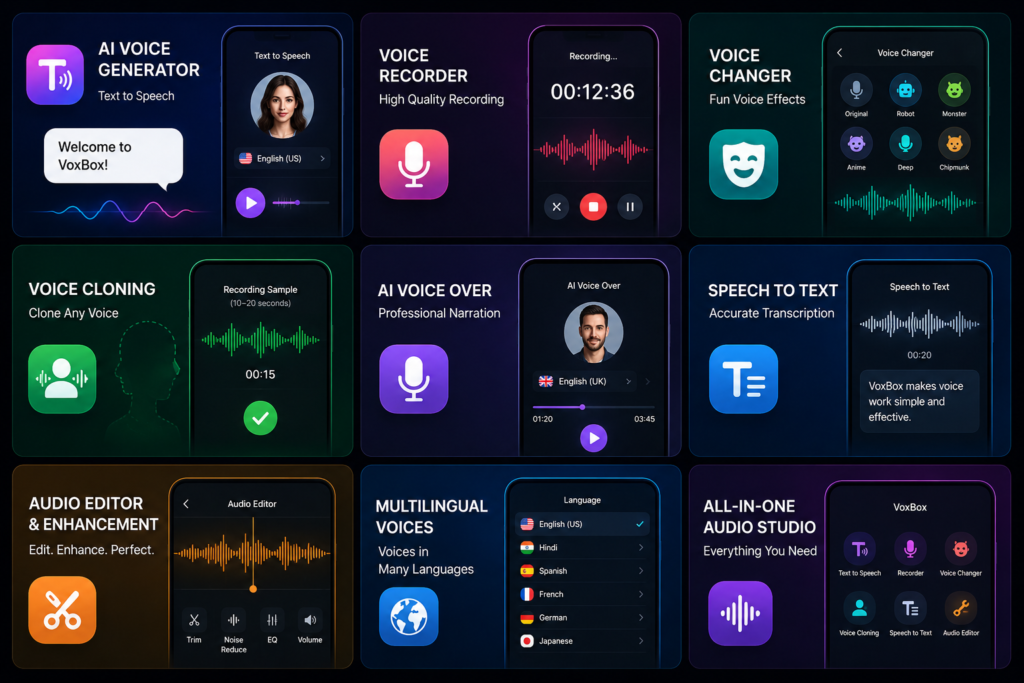
AI Voice Generator & Recorder (VoxBox) combines AI text-to-speech, voice recording, speech-to-text, voice changing, voice cloning, and audio editing into a single Android app. It’s an excellent choice for creators, educators, podcasters, and professionals who regularly work with audio. If you only need a simple recorder, however, many of its advanced tools may go unused.
Why People Search for VoxBox
Most people aren’t searching for another voice recorder—they’re searching for a faster way to create quality audio.
Common questions include:
- Can AI generate natural-sounding voiceovers?
- Do I need multiple apps for recording and editing?
- Can I convert meetings into text?
- Is voice cloning actually useful?
- Will this save time when creating videos?
These are the real questions users want answered before installing the app.
Table of Contents
What Most Users Want to Know
Is VoxBox just another AI voice app?
Not really.
Most AI voice apps specialize in one feature, such as text-to-speech or voice changing. VoxBox attempts to bring together nearly every common audio task into one place.
Instead of switching between several apps, you can potentially write a script, generate narration, record additional audio, edit it, and export the final result from a single workspace.
That convenience can be more valuable than any individual feature.
Is it suitable for beginners?
Yes, although beginners may not use every feature immediately.
Someone creating YouTube videos can start with AI voice generation and gradually explore speech-to-text, editing, and voice effects as their needs grow.
What VoxBox Actually Does
VoxBox is designed to simplify audio creation.
It allows users to:
- Generate realistic AI voices from text
- Record voice directly from the phone
- Edit recordings
- Convert speech into written text
- Create AI voiceovers
- Change voice styles
- Clone voices where supported
- Produce multilingual audio
Rather than being a single-purpose application, it acts more like an audio toolkit.
Features That Actually Improve Your Workflow
AI Voice Generator & Text-to-Speech
Typing a script and instantly hearing it spoken is useful for much more than YouTube videos.
It can help with:
- Product demonstrations
- Educational lessons
- Audiobooks
- Presentations
- Accessibility
- Social media narration
The biggest advantage isn’t replacing human voices—it’s speeding up early drafts and repetitive narration.
Voice Recorder
Recording quality matters more than many users realize.
VoxBox lets users capture interviews, lectures, podcasts, meetings, or personal notes without needing a separate recorder app.
For creators, keeping recording and editing inside one application saves valuable time.
Speech-to-Text
One overlooked productivity feature is transcription.
Imagine finishing a 45-minute interview.
Instead of replaying the recording several times while typing notes, speech recognition creates a draft transcript that can be corrected later.
Even if small edits are needed, that’s still significantly faster than starting from scratch.
Voice Changer
Voice effects are useful for more than entertainment.
They can also help:
- Hide your natural voice in creative projects
- Create different characters
- Add variety to storytelling
- Produce unique gaming content
Professional business narration, however, is usually better served by natural voice styles.
Voice Cloning
Voice cloning often attracts the most attention, but it should also be used responsibly.
It works best for:
- Consistent narration
- Digital avatars
- Personalized projects
- Brand voice continuity
Always obtain proper permission before cloning another person’s voice, and follow applicable laws and platform policies.
Audio Editing
Many viewers forgive average video quality.
They rarely forgive poor audio.
Simple improvements such as:
- removing background noise,
- trimming silence,
- balancing volume,
- improving vocal clarity,
can dramatically improve how professional your content feels.
Good audio builds trust faster than expensive visual effects.
An Important Detail Most Reviews Ignore
Most reviews compare how realistic AI voices sound.
Very few discuss how much time the app can actually save.
Ask yourself:
How many separate apps do you currently open to finish one audio project?
If your answer includes:
- Recorder
- Audio editor
- Subtitle generator
- Text-to-speech website
- Voice changer
then your biggest improvement may not come from better AI voices.
It may come from simply reducing app switching.
Less switching means fewer exports, fewer imports, and fewer chances to lose files or forget edits.
That workflow improvement often becomes the feature users appreciate most after several weeks.
Real-World Use Cases
YouTubers
Generate narration without recording every script manually.
You May Also Like
 Girl Voice Audio: Is Voice Changer Audio Effects Worth Using?
![Reality of AI Call and Voice Translator App for Android 2026 [UNLIMITED CALL]](https://tnshorts.com/wp-content/uploads/2026/04/AI-Call-and-Voice-Translator-App-for-Android-2026-300x200.webp "Reality of AI Call and Voice Translator App for Android 2026 [UNLIMITED CALL] 2") Reality of AI Call and Voice Translator App for Android 2026 [UNLIMITED CALL]
Reality of AI Call and Voice Translator App for Android 2026 [UNLIMITED CALL]
 Any Voice Changer and Voice Effects App for Android 2026 – What It Does and When It Is Useful
 AI Voice Clone Voice Generator Apps on Android in 2026 – What They Do and How They Work ANY VOICE
Teachers
Create spoken lessons and educational material quickly.
Students
Record lectures and convert important discussions into searchable notes.
Podcasters
Record, clean, and enhance spoken audio before publishing.
Businesses
Produce product explainers, presentations, and promotional voiceovers.
Social Media Creators
Create narration for Shorts, Reels, TikTok, and other short-form content with less effort.
Benefits
- Multiple AI audio tools in one app
- Realistic text-to-speech generation
- Built-in voice recording
- Speech-to-text transcription
- Voice changing and cloning features
- Audio editing tools included
- Helpful for both creative and professional work
- Reduces dependence on multiple separate applications
Limitations
Every AI audio app has trade-offs.
Potential limitations include:
- Some advanced voices or features may require a subscription.
- AI voices still may not match human emotion in every situation.
- Voice cloning should always be used ethically and legally.
- Processing larger projects can take additional time.
- Recording quality still depends heavily on your microphone and recording environment.
Things to Know Before Installing
Before downloading VoxBox:
- Install it only from the official Google Play Store.
- Review microphone and storage permissions before granting access.
- Some AI features may require an active internet connection.
- Check subscription details if you plan to use premium voices.
- Better microphones generally produce better editing results.
One practical suggestion is to test the app with a short recording before moving an important project into it.
This helps you understand the workflow without risking valuable work.
Safety & Privacy Considerations
According to the available information:
- VoxBox is distributed through the official Google Play Store.
- Voice cloning should only be used with proper authorization.
- Review the latest privacy policy to understand how recordings and voice data are handled.
- Avoid uploading confidential conversations or sensitive recordings to any cloud-based AI service unless you’re comfortable with the provider’s privacy practices.
As with any AI application, it’s a good habit to review permissions after major updates.
Who Should Use VoxBox?
This app is a strong choice for:
- YouTube creators
- TikTok creators
- Podcasters
- Teachers
- Students
- Small businesses
- Audiobook creators
- Social media managers
- Anyone who regularly creates spoken content
Who Should Avoid It?
VoxBox may not be the best choice if you:
- Only need a basic voice recorder.
- Prefer lightweight offline applications.
- Rarely edit audio.
- Don’t use AI-generated voices.
- Need advanced studio-grade music production.
Better Alternatives
ElevenLabs
Best for: Ultra-natural AI narration
Strengths
- Extremely realistic AI voices
- Excellent multilingual support
Trade-off
Focuses mainly on AI voice generation instead of offering a complete audio workspace.
CapCut
Best for: Video creators
Strengths
- Integrated video editing
- AI voice generation for videos
Trade-off
Audio features are primarily designed around video projects.
Dolby On
Best for: Clean voice recording
Strengths
- Excellent automatic audio enhancement
- Very easy to use
Trade-off
Doesn’t include advanced AI voice generation or cloning.
Google Recorder
Best for: Meetings and note-taking
Strengths
- Fast transcription
- Simple interface
Trade-off
Limited creative audio production features.
Final Recommendation
AI Voice Generator & Recorder (VoxBox) succeeds because it focuses on simplifying the entire audio creation process rather than excelling at only one feature.
Its biggest advantage is convenience. Recording, editing, AI narration, transcription, voice effects, and voice cloning are available within one workflow, making it especially useful for creators who produce content regularly.
Choose VoxBox if you:
- Frequently create voice-based content.
- Need AI-generated narration.
- Want recording and editing in one app.
- Prefer reducing the number of audio tools you use.
Consider alternatives if you:
- Only need a simple recorder.
- Want desktop-level music production.
- Prefer offline-only recording software.
For creators, educators, marketers, and professionals who regularly work with spoken content, VoxBox offers a practical all-in-one solution that can simplify everyday audio production.
Frequently Asked Questions
Is VoxBox free to use?
The app may offer both free and premium features. Check the latest Google Play listing for current pricing and subscription details.
Can VoxBox generate realistic AI voices?
Yes. The app is designed to convert text into natural-sounding speech for various types of content.
Can I record my own voice?
Yes. VoxBox includes a built-in voice recorder alongside its AI-powered tools.
Does it support speech-to-text?
Yes. Speech-to-text functionality can convert spoken audio into editable text for notes, meetings, or subtitles.
Is voice cloning safe to use?
Voice cloning should only be used with proper consent and in accordance with applicable laws and platform policies.
Does VoxBox work for YouTube creators?
Yes. It can help create narration, edit recordings, generate AI voiceovers, and improve overall audio production workflows.
Can beginners use VoxBox?
Yes. Beginners can start with recording or text-to-speech while gradually exploring more advanced features like editing, transcription, and voice cloning.
Editorial Disclosure
TNShorts publishes independent Android app reviews, guides, comparisons, and educational content.
This article is based on publicly available information and practical analysis. Features, pricing, permissions, privacy practices, and availability may change over time. Readers should verify the latest information through the official Google Play Store listing and the developer’s documentation before making decisions.
More Articles You May Like
![Sound Changer – EDIT VOICE Effects Apps for Android in 2026: Do They Really Work? [EDIT VOICE]](https://tnshorts.com/wp-content/uploads/2026/02/Voice-Changer-Sound-Effects-apps-for-Android-300x200.webp "Sound Changer – EDIT VOICE Effects Apps for Android in 2026: Do They Really Work? [EDIT VOICE] 5") Sound Changer – EDIT VOICE Effects Apps for Android in 2026: Do They Really Work? [EDIT VOICE]
Sound Changer – EDIT VOICE Effects Apps for Android in 2026: Do They Really Work? [EDIT VOICE]
 What Are Fun Voice Changer Apps for Android? (EFFECT VOICE 2026)
 Real Voice Changer 2025 Review — Fun, Fast & Feature-Rich Voice Effects for Android
 🎙️ AI Voice Generator 2025 – Deepfake Multiple Voice & Text-to-Speech App for Android