
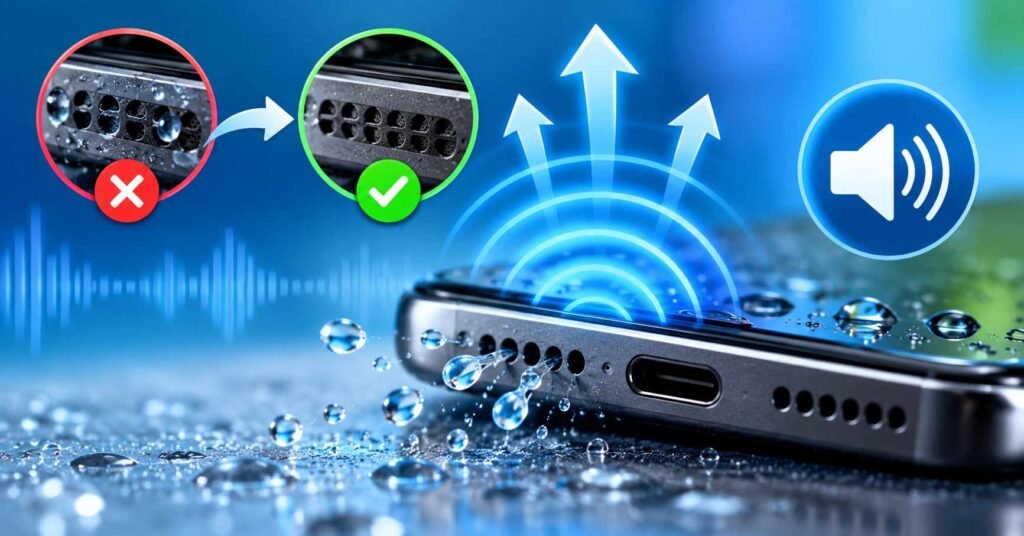
Your phone gets splashed with water. Everything seems normal until you play a video or answer a call. Suddenly, the sound is quiet, distorted, or strangely muffled.
Searching for a speaker cleaner might lead you to an app that promises to eject water using sound.
But does it work, and is it the right solution for your phone?
The answer depends on what is causing the problem. A speaker cleaner can sometimes help with trapped water near the speaker grille. It is not a substitute for drying a wet phone or repairing damaged audio hardware.
Table of Contents
Quick Answer: Do Speaker Cleaner Apps Work?
Yes, speaker cleaner apps may help remove small amounts of water trapped around a functioning phone speaker. They play specially generated tones that vibrate the speaker diaphragm, potentially moving droplets away from the opening.
However, they cannot guarantee complete water removal, detect internal moisture, repair speaker components, or fix every type of muffled audio.
For an otherwise functioning phone that experienced a minor splash, a short cleaning cycle may be worth considering once the phone is safe to operate. If the device was submerged, has charging problems, or shows signs of internal damage, prioritize the manufacturer’s drying and repair instructions instead.
Quick Overview
| Detail | Information |
|---|---|
| App | Speaker cleaner – water eject |
| Google Play developer | mobiledevca |
| Main purpose | Water-eject sounds and speaker testing |
| Cleaning options | Quick, standard, deep, custom |
| Manual frequency control | Listed as available |
| Speaker testing | Low, mid, high and audio-channel tests |
| Account | Not required according to the listing |
| Ads | Yes |
| In-app purchases | Yes |
| Physical speaker repair | No |
| Best suited for | Minor suspected moisture around a working speaker |
App information checked against the Google Play listing, October 8, 2026. Listed capabilities have not been independently tested on a physical device.
First, Find Out Why Your Speaker Sounds Muffled
Not every low-volume speaker needs a cleaning app.
Two phones can produce the same muffled sound for completely different reasons. One might have water around the grille, while another has accumulated pocket lint or an incorrect audio setting.
Use this simple decision guide before installing anything.
| What you notice | Best next action |
|---|---|
| Sound became muffled after a minor splash | Dry the exterior, then consider a short water-eject cycle if safe |
| Sound gradually became quieter over months | Check for accumulated dirt and follow approved exterior-cleaning guidance |
| Bluetooth works, but the phone speaker is quiet | Check audio routing, settings, and the built-in speaker |
| Sound is clear during videos but not calls | Check the call earpiece, call volume, and audio route |
| Speaker crackles heavily or produces no sound | Consider manufacturer diagnostics or servicing |
| Phone fell into water and has other problems | Power it off and follow official drying guidance |
This distinction matters because a frequency generator only controls sound output. It cannot determine what is physically blocking the speaker.
What Is Speaker cleaner – water eject?

Speaker cleaner – water eject is an Android utility published under the developer name mobiledevca.
Instead of requiring special hardware, it plays generated sound patterns through your phone’s speaker. The developer offers automatic water-eject modes, customizable frequencies, and audio tests.
Available through Google Play. Free installation with advertising and optional in-app purchases.
Unlike cleaning tools that physically contact the speaker grille, this app uses acoustic vibration. Its potential usefulness comes from moving accessible water droplets, not from removing water inside the entire phone.
Which cleaning mode should you choose?
The Play Store description lists four cleaning options, but more powerful-sounding names do not necessarily mean better results.
| Mode | When it makes sense |
|---|---|
| Quick Clean | A short 15-second test after minor moisture exposure |
| Water Eject | The normal automatic cleaning sequence |
| Deep Clean | A longer sequence for comparison, not a guaranteed deeper repair |
| Custom Clean | For users who understand duration and frequency adjustments |
For most people, the automatic option is the sensible starting point. Manually adjusting frequencies is not essential to determine whether an easily accessible droplet can be moved.
The overlooked limitation of manual frequency controls
The app includes a frequency generator, but users should not assume that selecting a higher number creates stronger cleaning.
Sound frequency and speaker loudness are different properties. The speaker’s physical response depends on its design, playback volume, and the signal itself.
A frequency that produces strong vibration on one handset might produce very little movement on another. Some phones also limit or filter low-frequency audio.
That is why copying a particular frequency setting from a video does not guarantee the same result on your device.
How to Use Speaker Cleaner Without Making Things Worse
For a phone that experienced only a minor splash and is otherwise working normally:
- Disconnect the charging cable, wired earphones, and Bluetooth audio devices.
- Wipe visible water from the exterior using a soft, dry cloth.
- Check that there are no signs of major liquid exposure, overheating, or other malfunction. If there are, power off the device instead.
- Remove the case if it obstructs the speaker opening.
- Once safe to operate, hold the phone with the affected speaker opening facing downward.
- Open Speaker Cleaner and select Quick Clean or Water Eject.
- Start at a moderate media volume and increase cautiously if needed. Keep the speaker away from your ears.
- Let the short cycle finish, then compare the sound using familiar audio at the same volume.
If the sound remains muffled, stop and allow further natural drying. Repeated maximum-volume cleaning cycles are not a substitute for diagnosing a persistent problem.
Google recommends switching off a Pixel phone after water exposure, drying the exterior, and allowing it to dry at room temperature. Always prioritize guidance for your particular device.
How to Tell Whether Cleaning Actually Helped
One feature that deserves more attention than the cleaning animation is the built-in speaker test.
It can help users make a before-and-after comparison, but it should not be mistaken for professional hardware diagnostics.
A practical method is to play the same 10-second audio clip before and after cleaning, using identical volume and settings. Compare three things:
- Clarity: Are spoken words easier to understand?
- Distortion: Has the rattling or fuzzy sound decreased?
- Consistency: Does the improvement remain after normal playback resumes?
Use the app’s low-, mid-, and high-frequency tests as supplementary checks.
Importantly, the listed left/right audio test does not prove that a particular physical speaker is working independently. Android devices may route, mix, or downmix audio channels differently.
If sound appears normal in a test but remains weak in a particular calling app, investigate call-volume settings, audio routing, and that app’s behaviour before assuming there is trapped water.
Six Things Speaker Cleaner Cannot Do
Understanding the limits of sound-based cleaning can save users time and prevent poor decisions.
1. It cannot dry the charging port. Speaker audio does not extract moisture from a USB-C connector. A moisture warning requires separate attention.
2. It cannot restore waterproofing. Water resistance depends on the phone’s construction, seals, age, and physical condition. Playing cleaning tones does not repair any protective seal.
3. It cannot reliably remove packed dust. Vibrations may move loose particles, but densely packed lint or sticky residue often requires a different approach.
4. It cannot repair a damaged speaker. A broken diaphragm, electrical fault, or corrosion will not be repaired by changing sound frequencies.
5. It cannot confirm that the inside is dry. A cleaner’s progress indicator generally indicates playback progress, not measured moisture removal. The developer’s listing does not establish a physical water-detection capability.
6. It cannot guarantee the same result on every phone. Speaker shape, acoustic tuning, grille placement, and the nature of the contamination all matter.
The key question is not whether the app can make the speaker vibrate. It is whether vibration addresses the actual cause of your audio problem.
Things to Know Before Installing
The app is free to install, but the Google Play listing identifies advertising and in-app purchases.
Before paying for any additional functionality, check whether the standard Water Eject mode and speaker tests are sufficient. A paid feature does not necessarily produce better water-removal results.
You May Also Like
There are also three practical considerations.
Internet access: The listing says the core sound-generation functionality works locally. That does not establish that all parts of the app, including advertising or purchase verification, function offline.
Permissions: Playing sound generally does not require access to your contacts, location, or microphone. If the app requests permissions, check what each is used for before granting it.
Compatibility: An audio channel test or frequency sweep may behave differently across manufacturers. A phone’s audio processing can influence the sounds that actually reach its speakers.
Safety and Privacy: Is Speaker Cleaner Safe to Install?
There is an important difference between being available on Google Play and having independently verified privacy practices.
The app’s Play Store Data safety section currently declares:
- No data collected.
- Possible sharing of app information, performance data, and device or other identifiers with third parties.
- Data encrypted in transit.
- Data cannot be deleted, according to the displayed declaration.
These are developer-provided declarations, not an independent security audit.
The distinction between no data collected and some data shared deserves attention, particularly for a small utility whose main function is sound playback. Users should review the current privacy policy, advertising behaviour, and permissions before installing.
For people seeking a simple water-eject sound without installing another application, a reputable browser-based sound generator is an alternative, although the website’s own privacy and advertising practices still matter.
When You Should Not Use a Speaker Cleaning App
Avoid treating sound cleaning as the first response in these situations:
- Your phone was submerged or soaked extensively.
- The liquid was seawater, a sugary drink, or another contaminant.
- The phone is overheating, restarting, or behaving abnormally.
- A USB moisture warning is active.
- There are signs of damaged components or persistent severe distortion.
- The phone has visible physical damage.
For significant water exposure, switch off the device and follow manufacturer guidance. Do not charge it while wet, insert objects into the speaker or port, or use a hairdryer to force drying.
Google specifically warns that charging in the presence of moisture can cause injury or device damage.
Speaker Cleaner App vs Other Solutions
Not everyone needs a dedicated application.
| Option | Best for | Main drawback |
|---|---|---|
| Speaker Cleaner app | Short cleaning cycles, custom tones and sound tests | Ads, potential purchases, and no repair capability |
| Browser-based water-eject sound | Occasional use without installing an app | Website privacy, ads, and playback limitations vary |
| Manufacturer diagnostics | Identifying possible audio hardware problems | Tools vary between phone models |
| Authorized repair service | Persistent faults, contamination, or physical damage | May require time and money |
A browser-based option may be enough if all you need is a brief audio sequence. A dedicated app becomes more useful when you want convenient repeatable cycles and integrated testing.
For serious water damage, neither option replaces inspection by a qualified technician.
Who Should Use Speaker Cleaner?
This app is worth considering if your Android phone is otherwise functioning normally, the speaker became slightly muffled after a minor splash, and you want a straightforward way to play cleaning sounds and compare the results.
It may also appeal to users who occasionally test sound output or experiment with audio frequencies.
Who Should Avoid It?
Users whose phones have experienced substantial liquid exposure, have visible damage, or show charging and electrical problems should avoid relying on the app as a repair solution.
It is also unnecessary for anyone whose issue is an incorrect audio route, a blocked Bluetooth connection, or an ordinary volume setting.
For a person who only wants to remove visible dry dirt from a speaker grille, manufacturer-approved exterior cleaning may be more relevant than sound-based cleaning.
Frequently Asked Questions
1. Can speaker cleaner really remove water?
It may help displace small droplets near the speaker opening by producing sound vibrations. It cannot guarantee removal or dry moisture deeper inside the phone.
2. Does Speaker Cleaner increase phone volume?
It is not a hardware volume booster. Sound may seem clearer or louder if a droplet that was obstructing the speaker moves away.
3. Can I use speaker cleaner on a Samsung, Redmi, Realme, Vivo or OPPO phone?
The general sound-generation method is not specific to one manufacturer. Actual compatibility and results depend on the device and supported Android version. Follow your phone maker’s safety instructions.
4. Is it safe to run water-eject sounds at maximum volume?
Unnecessarily prolonged or uncomfortable high-volume playback is best avoided. Begin at a moderate level, keep the phone away from your ears, and stop if you hear severe distortion or abnormal sounds.
5. Can speaker cleaner remove dust permanently?
No. Sound may disturb some loose particles, but it cannot reliably remove compacted lint, sticky debris, or contamination behind the grille.
6. Why is my speaker still muffled after using the app?
Possible explanations include remaining moisture, a physical obstruction, a damaged speaker, or an unrelated audio setting. Allow appropriate drying and investigate the underlying cause rather than repeatedly playing tones.
7. Do I need to pay for a speaker cleaner app?
Not necessarily. This app is free to install and offers in-app purchases. Check which features are free before spending money. Browser-based tone generators may also meet occasional needs.
8. Can Speaker Cleaner detect water inside my phone?
The described app features do not establish that capability. Audio testing and cleaning progress indicators are not reliable measures of internal moisture.
Final Verdict: Is Speaker Cleaner Worth Installing?
Speaker cleaner – water eject is a reasonable utility to consider for minor, suspected water obstruction around an otherwise working Android speaker.
Its automatic modes, manual frequency generator, and built-in speaker tests make it more versatile than a single water-eject audio file.
However, the value of these features should not be confused with proof of effective repair. Results depend on the phone and the cause of the problem. Ads, in-app purchases, and developer-declared data-sharing practices also deserve consideration.
For occasional minor moisture problems, try safe drying practices first and consider a short cleaning cycle only when the phone is safe to operate. For persistent faults or significant liquid exposure, follow manufacturer guidance or seek professional servicing.
TNShorts recommendation: Use speaker-cleaning apps as optional troubleshooting tools, not as emergency water-damage repair solutions.
Official app: Speaker cleaner – water eject on Google Play
Editorial Disclosure
TNShorts publishes independent Android app guides and practical mobile troubleshooting information. This guide is based on the developer’s publicly available Google Play description, technical analysis of sound-based cleaning, and manufacturer safety guidance. The app was not independently installed or benchmarked for this article.
Features, pricing, permissions, and privacy declarations can change. Readers should verify important information using official sources.
References: Google Play app listing · Google Pixel water-damage prevention · Google USB moisture warning guidance
TNShorts Publishing Recommendation
For this article, I would prioritize the search query “Does speaker cleaner work?” alongside the primary keyword “speaker cleaner.” It provides a clearer reason to click than repeating the application’s advertised feature list.
Three useful companion articles for building topical authority would be:
- Phone Speaker Sound Low but Not Wet? 7 Things to Check
- Water in Phone Charging Port vs Speaker: What to Do
- Clean Mobile Speaker Without an App: Safe Methods
These can target different reader problems and naturally link to one another without duplicating content.
The article deliberately avoids fabricated hands-on test results, unsupported success rates, and guaranteed water-removal claims. That is especially important for TNShorts’ credibility, user trust, and AdSense-oriented publishing quality.
More Articles You May Like
![Phone Speaker Dust Cleaner Sound 2026 – Does It Really Work? [GET WATER]](https://tnshorts.com/wp-content/uploads/2026/04/Phone-Speaker-Dust-Cleaner-2026-300x157.png "Phone Speaker Dust Cleaner Sound 2026 – Does It Really Work? [GET WATER] 6") Phone Speaker Dust Cleaner Sound 2026 – Does It Really Work? [GET WATER]
Phone Speaker Dust Cleaner Sound 2026 – Does It Really Work? [GET WATER]
![Speaker Cleaner Water Remover App for Android 2026 [PERFECT CLEAN] – What It Does and When It Really Helps](https://tnshorts.com/wp-content/uploads/2026/04/Speaker-Cleaner-Water-Remover-App-for-Android-2026-300x200.webp "Speaker Cleaner Water Remover App for Android 2026 [PERFECT CLEAN] – What It Does and When It Really Helps 7") Speaker Cleaner Water Remover App for Android 2026 [PERFECT CLEAN] – What It Does and When It Really Helps
Speaker Cleaner Water Remover App for Android 2026 [PERFECT CLEAN] – What It Does and When It Really Helps
![Speaker Cleaner with Water Eject App Android 2026 [AUTO CLEAN] – What It Does and When It Helps](https://tnshorts.com/wp-content/uploads/2026/03/Speaker-Cleaner-with-Water-Eject-App-Android-2026-300x200.webp "Speaker Cleaner with Water Eject App Android 2026 [AUTO CLEAN] – What It Does and When It Helps 8") Speaker Cleaner with Water Eject App Android 2026 [AUTO CLEAN] – What It Does and When It Helps
Speaker Cleaner with Water Eject App Android 2026 [AUTO CLEAN] – What It Does and When It Helps
![Why Speaker Cleaner Water Eject Apps Reached 5M+ Installs on Android in 2026 [OUT WATER]](https://tnshorts.com/wp-content/uploads/2026/03/Speaker-Cleaner-Water-Eject-Apps-Android-2026-300x200.webp "Why Speaker Cleaner Water Eject Apps Reached 5M+ Installs on Android in 2026 [OUT WATER] 9") Why Speaker Cleaner Water Eject Apps Reached 5M+ Installs on Android in 2026 [OUT WATER]
Why Speaker Cleaner Water Eject Apps Reached 5M+ Installs on Android in 2026 [OUT WATER]