
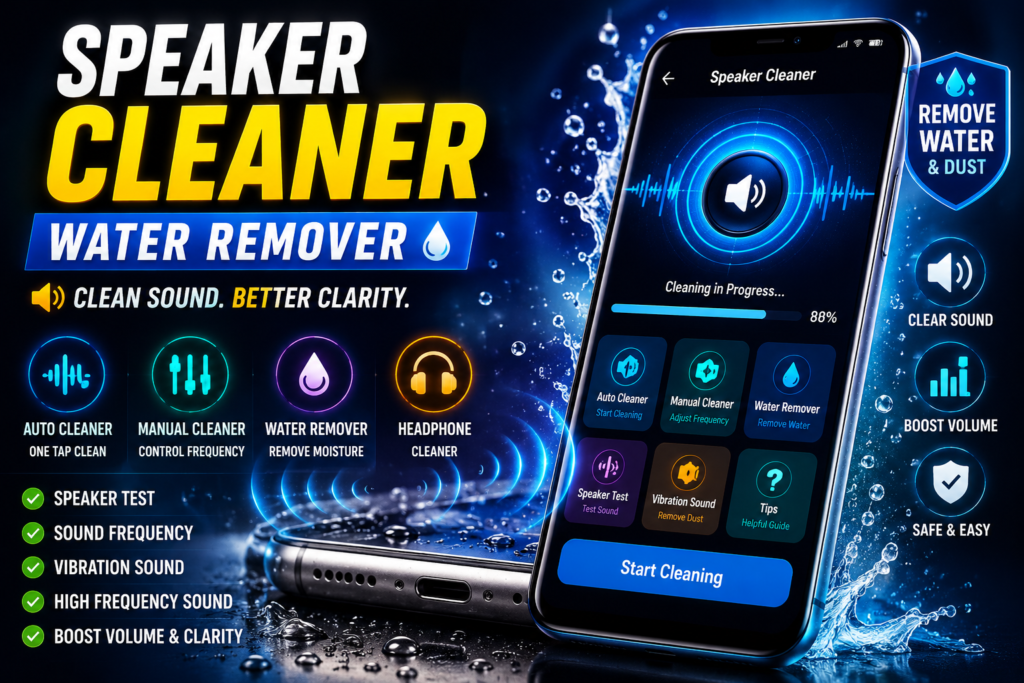
Smartphone speakers are exposed to dust, moisture, water splashes, and everyday dirt. Over time, these particles can affect sound quality, making audio seem lower, muffled, distorted, or unclear. This is especially common after accidental water exposure, rainy weather, workouts, or long-term device usage.
Speaker Cleaner: Water Remover is an Android audio utility designed to help users maintain better speaker performance using sound-based cleaning methods. The app combines speaker cleaning, water removal, audio testing, and frequency generation tools in one place.
Instead of opening the device or attempting risky cleaning methods, users can use controlled sound frequencies to help move moisture and small particles away from the speaker area.
Quick Overview
| Feature | Details |
|---|---|
| App Name | Speaker Cleaner: Water Remover |
| Category | Tools & Utilities |
| Platform | Android |
| Main Purpose | Speaker Cleaning & Water Removal |
| Cleaning Modes | Auto & Manual |
| Audio Tools | Frequency Generator |
| Speaker Testing | Available |
| Best For | Improving Speaker Clarity |
What Is Speaker Cleaner: Water Remover?
Speaker Cleaner: Water Remover is an Android utility app designed to help users improve speaker sound quality after exposure to water, dust, or debris.
The app uses specially generated sound frequencies and vibration-based audio patterns that may help move moisture and particles from the speaker grill.
It combines several useful audio maintenance tools into a single application.
Features include:
- Speaker cleaner
- Water remover
- Audio tester
- Frequency generator
- Volume booster tools
- Headphone cleaning support
- Speaker diagnostics
Why Do Phone Speakers Sound Muffled?
Many users notice reduced sound quality after:
- Water splashes
- Rain exposure
- Dust accumulation
- Pocket lint buildup
- Humid environments
- Daily wear and tear
Common symptoms include:
Low Volume
Speaker output sounds weaker than normal.
Distorted Audio
Music and voice playback become unclear.
Crackling Sounds
Moisture or debris may affect sound quality.
Reduced Clarity
Audio loses sharpness and detail.
Speaker cleaning tools are designed to help address these situations.
How Does Speaker Cleaning Work?
Speaker cleaning apps use sound waves and frequencies to create vibrations.
These vibrations may help:
- Push moisture outward
- Loosen small particles
- Improve speaker airflow
- Restore clearer sound output
The process is completely external and does not require opening the phone.
It relies on audio frequencies generated through the device speaker.
Auto Speaker Cleaner Mode
Auto Speaker Cleaner is designed for users who want a simple cleaning process.
The app automatically plays optimized sound patterns designed for speaker cleaning.
Benefits include:
- Easy operation
- One-tap cleaning
- Automatic frequency selection
- Convenient for beginners
Users simply start the cleaning process and allow the app to run its cleaning cycle.
Manual Speaker Cleaner Mode
Manual Speaker Cleaner provides greater control over the cleaning process.
Users can:
- Select frequencies
- Adjust sound patterns
- Experiment with cleaning modes
- Customize the cleaning process
This mode may be useful for advanced users who want more control over speaker maintenance.
Water Remover Mode
Water exposure is one of the most common causes of temporary speaker issues.
Water Remover Mode uses vibration-based audio frequencies that may help remove trapped moisture from the speaker area.
This feature can be useful after:
- Rain exposure
- Water splashes
- Bathroom humidity
- Outdoor activities
- Accidental moisture contact
Many users perform a speaker cleaning cycle immediately after water exposure.
Headphone & Audio Cleaning Support
Speaker Cleaner: Water Remover also includes tools related to headphone audio maintenance.
Features may include:
Headphone Cleaner
Helps test audio output quality.
Audio Cleaner
Designed to improve listening experience through sound-based maintenance.
You May Also Like
![Phone Speaker Dust Cleaner Sound 2026 – Does It Really Work? [GET WATER]](https://tnshorts.com/wp-content/uploads/2026/04/Phone-Speaker-Dust-Cleaner-2026-300x157.png "Phone Speaker Dust Cleaner Sound 2026 – Does It Really Work? [GET WATER] 3")
![Speaker Cleaner Water Remover App for Android 2026 [PERFECT CLEAN] – What It Does and When It Really Helps](https://tnshorts.com/wp-content/uploads/2026/04/Speaker-Cleaner-Water-Remover-App-for-Android-2026-300x200.webp "Speaker Cleaner Water Remover App for Android 2026 [PERFECT CLEAN] – What It Does and When It Really Helps 4")
Water Sound Patterns
Uses specific audio patterns during cleaning cycles.
Frequency Waves
Generates sound frequencies for audio testing and maintenance.
These tools help users evaluate audio quality after cleaning.
Speaker Test Feature
Cleaning is only useful if users can verify the results.
The Speaker Test feature helps users check:
- Volume output
- Left-right balance
- Clarity
- Speaker response
- Audio quality
Running a speaker test before and after cleaning helps determine whether improvements have occurred.
Frequency Generator Tool
Frequency generation is one of the core functions of the app.
Users can generate:
- Low frequencies
- High frequencies
- Custom sound patterns
- Vibration frequencies
These frequencies are used during speaker cleaning and audio testing processes.
The tool may also help users better understand speaker performance.
Benefits of Using Speaker Cleaner: Water Remover
Improved Sound Clarity
Many users report clearer audio after cleaning cycles.
Convenient Maintenance
No need to disassemble the phone.
Water Removal Assistance
Helpful after accidental moisture exposure.
Speaker Testing
Allows users to evaluate speaker performance.
Multiple Audio Tools
Several maintenance features are available in one application.
When Should You Use Speaker Cleaner?
Consider using speaker cleaning tools when:
- Audio sounds muffled.
- Volume seems lower than usual.
- The phone was exposed to rain.
- Water splashed onto the device.
- Speaker quality has decreased.
- Dust buildup is suspected.
Regular maintenance may help keep speakers performing well.
When Should You Avoid Relying Only on Software?
While speaker cleaning apps can be helpful, they cannot fix every hardware issue.
Professional repair may be necessary if:
- Speaker hardware is damaged.
- Audio remains completely silent.
- Internal components have failed.
- Water damage is severe.
In these situations, software cleaning alone may not resolve the problem.
Is Speaker Cleaner: Water Remover Safe?
The app uses sound frequencies generated through the speaker.
General safety recommendations include:
- Avoid excessively high volume levels.
- Follow app instructions.
- Use cleaning cycles responsibly.
- Download apps from trusted sources.
As with any utility app, users should review permissions and app information before installation.
Who Should Use Speaker Cleaner: Water Remover?
This app may be useful for:
Android Users
Anyone experiencing reduced speaker quality.
Outdoor Users
People frequently exposed to rain or moisture.
Music Listeners
Users who depend on clear speaker audio.
Travelers
People who use smartphones in various environmental conditions.
General Smartphone Owners
Anyone interested in maintaining speaker performance.
Final Thoughts
Speaker Cleaner: Water Remover offers a practical collection of audio maintenance tools designed to help Android users improve speaker clarity, test sound quality, and assist with water removal after moisture exposure.
With features such as Auto Speaker Cleaner, Manual Cleaning Mode, Water Remover Mode, Frequency Generator, Speaker Testing, and Headphone Support, the app provides multiple ways to monitor and maintain audio performance.
While it is not a replacement for hardware repair when physical damage occurs, it can be a useful utility for users who want a simple way to help keep their smartphone speakers sounding clear and responsive.
More Articles You May Like
![Speaker Cleaner with Water Eject App Android 2026 [AUTO CLEAN] – What It Does and When It Helps](https://tnshorts.com/wp-content/uploads/2026/03/Speaker-Cleaner-with-Water-Eject-App-Android-2026-300x200.webp "Speaker Cleaner with Water Eject App Android 2026 [AUTO CLEAN] – What It Does and When It Helps 5") Speaker Cleaner with Water Eject App Android 2026 [AUTO CLEAN] – What It Does and When It Helps
Speaker Cleaner with Water Eject App Android 2026 [AUTO CLEAN] – What It Does and When It Helps
![Why Speaker Cleaner Water Eject Apps Reached 5M+ Installs on Android in 2026 [OUT WATER]](https://tnshorts.com/wp-content/uploads/2026/03/Speaker-Cleaner-Water-Eject-Apps-Android-2026-300x200.webp "Why Speaker Cleaner Water Eject Apps Reached 5M+ Installs on Android in 2026 [OUT WATER] 6") Why Speaker Cleaner Water Eject Apps Reached 5M+ Installs on Android in 2026 [OUT WATER]
Why Speaker Cleaner Water Eject Apps Reached 5M+ Installs on Android in 2026 [OUT WATER]
 What Is a Speaker Cleaner with Remove Water App for Android? (SOUND CLARITY 2026)
 What Is a Speaker Cleaner with Eject Water App for Android? (PURE SOUND 2026)
1 thought on “Speaker Cleaner Water Remover – Android Speaker Cleaning Guide 2026”