
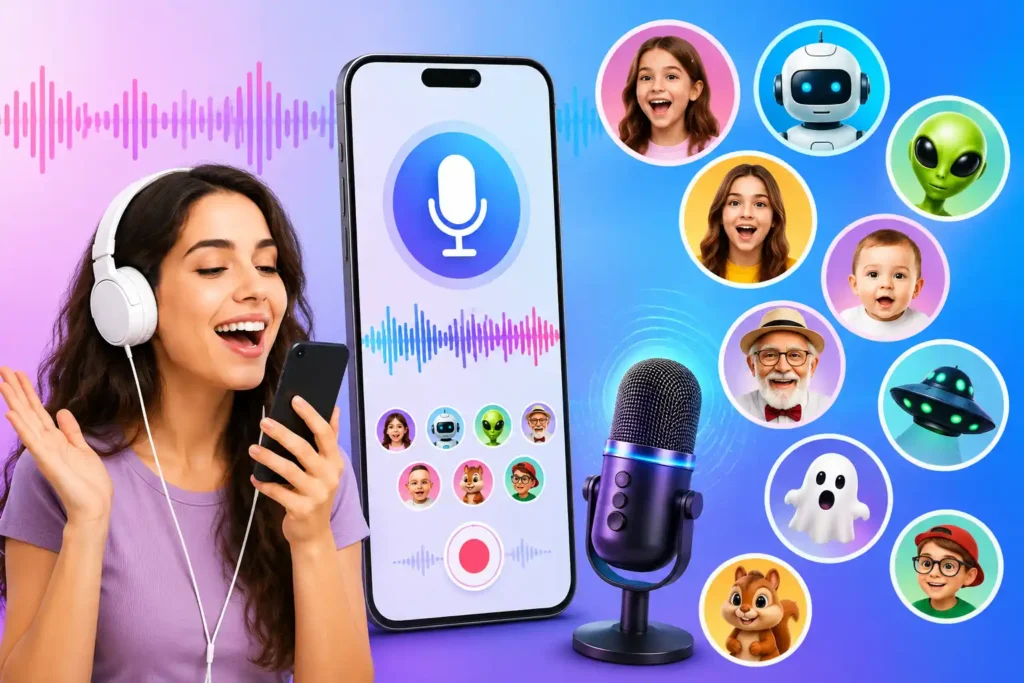
If you searched “Change Voice Audio”, you probably do not need a complicated audio editor. You may simply want to record something, make the voice sound funny or different, save it, and share it.
Voice Changer Audio Effects is designed mainly for that kind of casual use. It offers voice recording, imported-audio editing, text-to-voice, multiple character-style effects, sharing, and ringtone creation.
But there is one important distinction to understand before installing it: changing a saved recording is not the same thing as changing your voice during a normal phone call.
Quick Answer
Voice Changer Audio Effects is worth considering for fun recordings, short social-media audio, voice messages, text-to-voice experiments, and custom ringtones.
Its biggest attraction is convenience: the developer advertises 50+ voice effects, including robot, alien, child, giant, ghost and male-to-female-style effects.
However, install it primarily as a record-and-edit voice effects app, not because you expect professional voice conversion or guaranteed real-time voice changing in every phone or messaging call.
That distinction can save you from installing the wrong type of app.
Table of Contents
What Does “Change Voice Audio” Actually Mean?
Voice-changing apps can perform several very different jobs, even though Play Store descriptions often use similar terminology.
A user might want to:
- record their voice and apply an effect afterward;
- import an existing audio file and modify it;
- type text and generate spoken audio;
- create a funny voice message for sharing;
- make a custom ringtone;
- change their microphone voice live;
- change their voice during an actual phone or internet call.
These functions should not be treated as interchangeable.
For this app, the clearest practical strengths are recording, applying effects, editing imported audio, text-to-voice and sharing the result.
What Voice Changer Audio Effects Does
The basic workflow is straightforward:
Record or import audio → choose an effect → listen to the result → save or share it.
The developer advertises more than 50 effects and character voices. Examples include child, girl, old man, robot, alien, giant, zombie, ghost and various animal or comic-style sounds.
This variety matters more for entertainment than audio quality. Instead of manually changing pitch and other audio parameters, someone who just wants a funny result can select a preset.
The app also supports custom voice effects, which may be more useful when a preset sounds too exaggerated for the recording you are making.
The Feature That May Be More Useful Than the Funny Voices
One easily overlooked feature is importing existing audio.
You do not necessarily have to record everything again inside the app. According to the developer description, an audio file already stored on your Android device can be imported and an effect applied to it.
That opens up some practical uses.
For example, you could record clean audio first, keep the original file untouched, and experiment with several effects afterward. That is generally a better workflow than recording an important clip only after an effect has already been applied.
For creators, keeping the original recording is particularly useful because an exaggerated effect that sounds funny through headphones may become difficult to understand after social-media compression.
Text to Voice Is a Different Tool
The app also provides text-to-voice functionality.
You type something, choose an available voice, and the app converts the text into spoken audio.
This can be useful when you do not want to record your own voice at all.
Possible uses include short joke clips, character dialogue, simple introductions and experimental social-media audio.
Do not confuse this with changing an existing human recording. Text-to-voice generates speech from text; a voice effect modifies audio you already recorded or imported.
Knowing which one you need can save several unnecessary steps.
Can It Really Change a Male Voice to a Female Voice?
The developer specifically promotes male-to-female voice effects.
Treat this as an audio effect, rather than assuming it will reproduce another person’s natural voice.
Simple voice effects often rely heavily on pitch and related audio processing. The result can be entertaining without necessarily sounding like a realistic human speaker.
That difference matters.
If your goal is a funny WhatsApp voice clip or entertainment video, an obvious effect may be perfectly acceptable. If your goal is natural-sounding dialogue for serious content, you may need a more sophisticated voice-production tool.
Does It Change Your Voice During Phone Calls?
This is where users should be particularly careful.
The app’s promotional wording references calls, but its clearly described functions center heavily on recording, applying effects, text-to-voice and sharing.
Do not assume that installing a voice changer means Android will automatically route the changed audio into every cellular, WhatsApp, Instagram, Discord or other voice call.
Real-time call voice modification is technically different from processing a recording.
Android versions, microphone routing and the calling app itself can affect what is possible.
Recent third-party summaries of user feedback also report complaints from some users expecting real-time/call functionality, alongside general reliability complaints. That does not establish how the app will behave on every device, but it is another reason not to install it solely for live calls.
TNShorts tip: If live call voice changing is your only requirement, verify that exact function on your own Android version before paying for anything.
Where This App Makes More Sense
The app is a better fit for prepared audio than mission-critical live communication.
A practical example is a short social-media clip. Record your sentence normally, apply two or three effects, preview them, and use whichever version remains easiest to understand.
It could also work well for:
Funny voice messages: Turn an ordinary recording into a robot, alien or character-style clip before sharing it.
Short videos: Add an unusual character voice to a Reel, Short or casual video without learning a full desktop audio editor.
Custom ringtones: The developer says transformed recordings can be set as ringtones.
Friends and family entertainment: Its preset-based design makes more sense for quick experimentation than precise audio engineering.
Text-based audio: Create speech without recording yourself when the text-to-voice output is suitable.
One Small Test I Recommend Before Doing Anything Important
Do not judge a voice effect only inside the app.
Create a 5–10 second test recording, apply the effect, save it, and play the resulting file using your normal media player.
You May Also Like
 AI Voice Generator & Recorder (VoxBox) Review: Is It Worth Using for Voiceovers, Podcasts, and Content Creation?
![Reality of AI Call and Voice Translator App for Android 2026 [UNLIMITED CALL]](https://tnshorts.com/wp-content/uploads/2026/04/AI-Call-and-Voice-Translator-App-for-Android-2026-300x200.webp "Reality of AI Call and Voice Translator App for Android 2026 [UNLIMITED CALL] 2") Reality of AI Call and Voice Translator App for Android 2026 [UNLIMITED CALL]
Reality of AI Call and Voice Translator App for Android 2026 [UNLIMITED CALL]
 Any Voice Changer and Voice Effects App for Android 2026 – What It Does and When It Is Useful
 AI Voice Clone Voice Generator Apps on Android in 2026 – What They Do and How They Work ANY VOICE
Then, if sharing is your goal, send that test file through the same app you normally use.
Why?
A voice can sound acceptable during the in-app preview but become less clear after export or messaging/social-platform compression. Effects that heavily alter pitch can make this more noticeable.
Testing a tiny sample first takes less time than redoing a long recording.
Benefits
The main benefit is that several simple audio tasks are collected in one app.
You can potentially record, experiment with many effects, process existing audio, generate speech from text and share the finished clip without learning a complex audio editor.
The 50+ effect selection is particularly useful for users who want variety rather than detailed professional controls.
Its ringtone option also gives saved recordings a use beyond social sharing.
Limitations You Should Know
The biggest limitation is expectation versus capability.
“Voice changer” can make people expect convincing real-time transformation. This app is easier to recommend for recordings and effects than for someone whose only requirement is live call modification.
The quality of a transformed voice will also depend on the original recording, background noise, microphone quality and selected effect.
Another consideration is advertising. The Play Store screenshot supplied for this article shows the app as containing ads and in-app purchases. The same screenshot showed a 3.0-star rating, 9.73K reviews and 1M+ downloads at the time it was captured. These values can change, so check the current listing rather than treating them as permanent figures.
Independent aggregation of more recent Play Store-derived information has also surfaced user complaints about advertising and glitches. Such reviews are subjective rather than proof that everyone will experience the same problems, but they are useful considerations before paying for an upgrade.
Things to Know Before Installing
The microphone is fundamental to an app that records your voice, so a microphone permission is expected when you use recording features.
Access related to audio/media may also be relevant when importing or saving audio. Third-party Play Store-derived app data has listed permissions including microphone recording and media/audio access for versions of this package.
Do not approve a permission simply because an app requests it. Consider whether that permission makes sense for the feature you are currently trying to use.
Android also lets you review app permissions later through the application’s system settings.
For the safest installation route, use the app’s official Google Play listing:
Privacy: Voice Apps Deserve a Little Extra Attention
Voice recordings can contain much more personal information than people realize.
A casual recording might include someone’s name, conversations in the background, workplace information, children’s voices or other identifying details.
Therefore, privacy should not be reduced to the question, “Is this app safe?”
Instead, check the current Data safety information and privacy policy on Google Play before installation because app practices can change between versions.
Also avoid using another person’s voice recording without appropriate permission, particularly if the transformed audio could mislead someone about who is speaking.
For ordinary entertainment, a simple rule works well: do not put sensitive information into a funny voice recording just because you intend to delete the finished clip later.
Who Should Use It?
Consider this app if your priority is quick entertainment and simple audio transformation.
It makes the most sense for people creating funny recordings, character voices, short social clips, custom ringtones or experimental text-to-speech audio.
It may also suit beginners who would rather tap a preset than learn pitch, EQ and other audio controls individually.
Who Should Avoid It?
Look elsewhere if you need professional voice-over production, studio-quality audio restoration, precise sound engineering or guaranteed live call voice transformation.
You should also reconsider it if you dislike ad-supported applications or want a minimal audio tool with very few permissions and features.
For professional content, a dedicated audio editor can provide substantially more control than dozens of novelty presets.
Better Alternatives Depend on What You Actually Need
There is no single “best voice changer” because several different problems are hidden behind that search.
If you only want to edit recordings, compare dedicated audio editors that offer pitch, speed and other manual controls.
If you want real-time gaming or chat voices, look specifically for a tool that explicitly supports your target communication app and Android version.
If you only need text converted to spoken audio, a dedicated text-to-speech tool may be simpler than installing a full voice-effects application.
And if your objective is merely a funny recording, Voice Changer Audio Effects may already provide more effects than you need.
Choose based on the workflow—not the number of effects advertised.
FAQs
Is Voice Changer Audio Effects free?
The supplied Google Play listing screenshot identifies the app as containing ads and in-app purchases. Check the current Play Store listing for current purchase details before installing.
Can I change an already recorded audio file?
According to the developer description, yes. The app supports importing audio and applying voice effects to it.
Does it have male-to-female voice effects?
Yes. Male-to-female transformation is one of the effects promoted by the developer. Remember that an effect does not guarantee a perfectly natural human voice.
How many voice effects are available?
The developer advertises 50+ funny voice effects, including several human, animal, sci-fi and spooky-style options.
Can I convert text into a voice?
Yes. The advertised text-to-voice feature lets you type text and generate spoken output using available voices.
Can I use a changed voice as my ringtone?
The developer states that transformed audio can be set as a ringtone.
Will it change my voice in every live phone or WhatsApp call?
Do not assume that. Live microphone/call processing is different from modifying a recording, and compatibility can depend on Android and the calling application.
Should I give the app microphone permission?
Recording your voice requires microphone access. Only grant permissions you understand and need, and review the current permission/Data safety information on Google Play before installation.
Final Recommendation
Voice Changer Audio Effects is best viewed as a casual voice-effects toolbox rather than a professional or guaranteed live-call voice changer.
Its strongest combination is recording + imported audio + 50+ effects + text-to-voice + sharing/ringtone options. That gives casual users several ways to create entertaining audio without learning complicated editing software.
The main cautions are equally important: transformed voices may sound artificial, advertisements may affect the experience, and users looking specifically for real-time call voice changing should verify compatibility before installing or purchasing anything.
For a funny recording, voice message or short creative clip, it is worth trying. For professional voice production or dependable live-call transformation, compare specialized alternatives first.
Editorial Disclosure
TNShorts publishes independent Android app reviews, guides, comparisons, and educational content. Content is based on publicly available information, practical analysis, and user-focused evaluation. Features, pricing, permissions, privacy practices, ratings and availability may change over time. Readers should verify important information through official developer sources before making decisions.
More Articles You May Like
![How to Work Prank Call – Voice Changer Apps Android [VARIETY VOICE 2026]](https://tnshorts.com/wp-content/uploads/2026/03/prank-call-voice-changer-apps-android-2026-300x200.webp "How to Work Prank Call – Voice Changer Apps Android [VARIETY VOICE 2026] 5") How to Work Prank Call – Voice Changer Apps Android [VARIETY VOICE 2026]
How to Work Prank Call – Voice Changer Apps Android [VARIETY VOICE 2026]
 AI Voice Changer Sound Effects Apps for Android (2026 CHANGE VOICE Guide)
![Sound Changer – EDIT VOICE Effects Apps for Android in 2026: Do They Really Work? [EDIT VOICE]](https://tnshorts.com/wp-content/uploads/2026/02/Voice-Changer-Sound-Effects-apps-for-Android-300x200.webp "Sound Changer – EDIT VOICE Effects Apps for Android in 2026: Do They Really Work? [EDIT VOICE] 7") Sound Changer – EDIT VOICE Effects Apps for Android in 2026: Do They Really Work? [EDIT VOICE]
Sound Changer – EDIT VOICE Effects Apps for Android in 2026: Do They Really Work? [EDIT VOICE]
 What Are Fun Voice Changer Apps for Android? (EFFECT VOICE 2026)