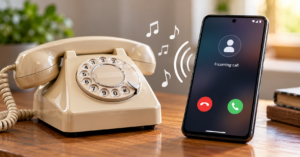
Your phone rings dozens of times, but the incoming-call screen normally looks almost exactly the same every time.
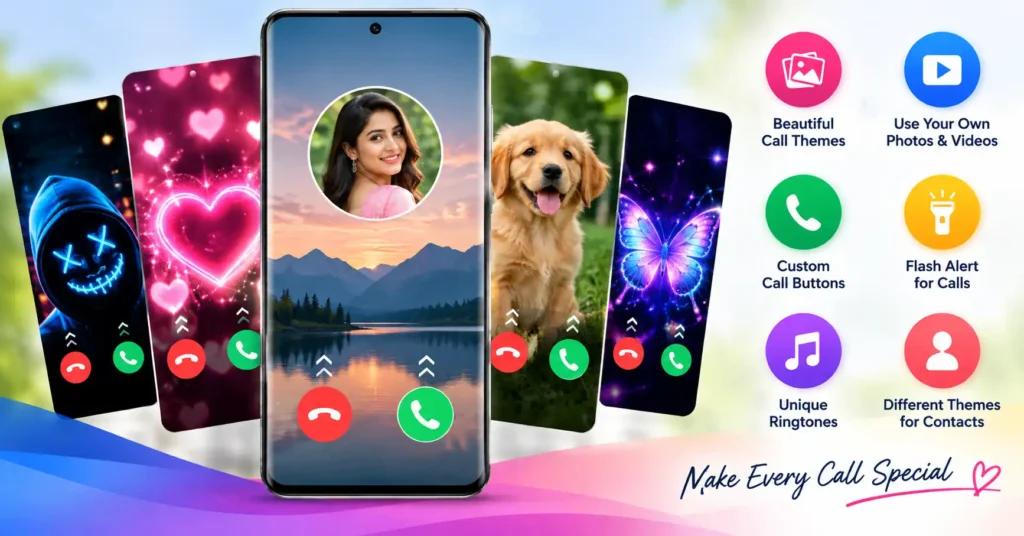
A Call Screen App tries to change that. Instead of the standard Android incoming-call interface, it can give calls a custom background, animated theme, different answer/reject buttons, ringtone effects, or camera-flash alerts.
One current example is Color Phone, Call Screen Theme from MixGroup, previously shown under the name Call Screen: Theme, Wallpaper. It is available through Google Play and is designed specifically around incoming-call personalization.
But there is an important question that screenshots of colorful themes don’t answer:
Do you really need another app running around something as important as receiving phone calls?
That is where the decision becomes more interesting.
Quick Answer
A call screen app makes sense mainly if you specifically want a visually customized incoming-call experience.
The MixGroup app can provide themed incoming-call screens, animated wallpapers, your own photo or video backgrounds, customized answer/decline buttons, contact-specific designs, ringtones and flash alerts.
However, this isn’t the same as simply changing your home-screen wallpaper.
Call-related personalization may require the app to interact more closely with Android and with information needed to provide the feature. You should therefore look at the permissions and Google Play Data safety information before enabling everything.
There is also a simpler decision rule:
If your normal Phone app already does everything you need, installing a separate call-screen app solely for decoration may provide little practical benefit.
If customization itself is what you want, however, this type of app has a clear purpose.
Table of Contents
Why People Search for a Call Screen App
There are actually several different problems hidden behind the search term “Call Screen App.”
One person wants their photo to appear when a particular contact calls. Another wants a full-screen animated incoming-call background. Someone who works in a noisy environment may care more about a flashing camera light than themes. And another user may simply be bored with the default Android call interface.
Those are different requirements.
For that reason, don’t choose a call-screen app simply because its Play Store screenshots look impressive. First decide what you want to change:
| Your actual need | Feature to look for |
|---|---|
| Make incoming calls look different | Call screen themes |
| Use your own picture | DIY/photo call wallpaper |
| Recognize people visually | Contact-specific themes |
| Notice calls in noisy environments | Flash alert |
| Change the sound too | Custom ringtone |
| Only change general phone appearance | You may not need a call-screen app |
That last distinction can save an unnecessary installation.
What Color Phone, Call Screen Theme Actually Does
The current Google Play description says the app supports multiple call-screen themes, animated/custom wallpapers, customized call buttons, flash-on-call alerts and ringtones. Users can also create a call screen using their own photos or videos and preview a design before applying it.
One particularly useful feature is different themes for individual contacts.
This is more than decoration.
For example, you might use one visual style for family members and another for other contacts. When the phone is lying several feet away, the visual difference can provide another recognition cue before you even read the caller name.
That is a more practical use of call-screen customization than continuously switching between hundreds of themes.
The flash feature solves a different problem
Flash on Call shouldn’t really be evaluated as part of the wallpaper feature.
Its purpose is visibility.
If the ringtone is difficult to hear in a noisy environment, a flashing camera light can provide another indication that a call is arriving. The developer specifically lists incoming-call flash alerts as a feature.
But it isn’t automatically useful everywhere. Flashing in a dark room can be distracting, and frequent alerts aren’t something every user will want.
So treat theme customization and flash notification as two separate reasons for using the app.
The Detail Many Users Overlook: Reliability Matters More Than the Theme
There is a fundamental difference between a wallpaper app and a call-screen app.
If your wallpaper fails to appear once, almost nothing important happens.
If an incoming-call interface doesn’t behave as expected, it affects an action you may need to perform immediately: seeing and answering a call.
That means the most important test isn’t whether the neon, anime or 3D theme looks attractive.
After configuring a third-party call screen, make a few test calls to the phone and check:
- whether the screen appears when the phone is locked;
- whether the caller name/number remains easy to read;
- whether answer and decline controls are immediately understandable;
- whether the normal incoming-call experience returns correctly when the customization is disabled;
- whether battery-saving settings affect its behaviour.
That small test tells you more about whether the app belongs on your phone than a gallery containing hundreds of themes.
Don’t Confuse a Call-Screen Theme With Caller Identification
This distinction is particularly important.
A colorful incoming-call screen and a caller-identification/spam-protection service solve different problems.
A theme app primarily changes how an incoming call looks or alerts you. It shouldn’t automatically be treated as a service that identifies unknown callers, detects scams or blocks spam unless the specific app explicitly provides those functions.
So if your real problem is:
“Who is this unknown number?”
then a cosmetic call-screen app may not be the tool you’re looking for.
If your problem is:
“I want incoming calls to look different.”
then it is much closer to the right category.
Things to Know Before Installing
The app is currently available through Google Play under the same package ID supplied for this article:
com.colorphone.callscreen.wallpaper.ringtone.calltheme
Google Play lists MixGroup as the developer and says the app contains ads and in-app purchases. Its content rating is Everyone.
For TNShorts readers, the most important point is to use the official Play Store listing rather than looking for unofficial APK copies.
Also remember that Android implementations vary between manufacturers. Samsung, Xiaomi, Vivo, Oppo, Motorola and other phones can differ in their Phone apps, battery-management behaviour and customization options.
An app behaving correctly on one Android phone therefore doesn’t guarantee an identical experience on another.
Safety & Privacy: Check This Before Tapping Allow
This deserves more attention than the theme catalogue.
According to the app’s current Google Play Data safety disclosure, the developer says the app may collect Location, App activity and two other data categories, and may share Location, App activity and two other categories with third parties. Google Play also currently states that data is encrypted in transit and that data can’t be deleted through the mechanism represented by that disclosure.
You May Also Like


Those declarations do not, by themselves, prove that an app is unsafe.
They do mean that privacy-conscious users have something concrete to consider before deciding whether visual call customization is worth the trade-off.
There is another useful habit here: don’t approve a permission merely because an app displays a request.
Ask:
“Which feature needs this permission?”
For example, a feature that assigns designs to individual contacts naturally needs different functionality from simply browsing a theme gallery.
If you don’t intend to use a feature, consider whether its associated access is necessary. Android’s permission controls can also be reviewed later from the app’s system settings.
Ads Matter More in This Category Than You Might Think
Google Play explicitly labels this app as containing ads.
That’s worth considering because a personalization app is often used differently from a utility that you open once per month.
You may spend time browsing, previewing and switching designs. Advertising can therefore have a larger effect on the experience than the feature list suggests.
The useful question isn’t simply:
“Does it contain ads?”
Google Play already answers that.
The better question is:
“Am I likely to use the customization frequently enough that the advertising experience matters to me?”
Someone who selects one theme and rarely opens the customization interface again may view that trade-off differently from someone who changes themes every few days.
Benefits
The strongest part of this type of app is straightforward: it can make something Android users see repeatedly feel more personal.
The MixGroup app combines several related functions instead of requiring a separate wallpaper tool, ringtone tool and flash-alert tool. It also supports personal photos/videos and contact-specific customization, according to its current listing.
That makes the concept particularly relevant to users who enjoy phone personalization.
And unlike a general wallpaper app, the customization appears exactly when somebody calls, so the change is highly visible.
Limitations
The biggest limitation isn’t a missing theme.
It is that appearance is the main benefit.
Changing an incoming-call screen won’t improve mobile reception, call quality or the underlying phone network. And users primarily concerned about spam calls, unknown callers or call management should evaluate tools designed for those specific purposes instead.
There are several other trade-offs:
- third-party call customization adds another app to an important phone workflow;
- behaviour can differ across Android devices;
- some users may find animated call screens unnecessarily distracting;
- the app contains ads and in-app purchases;
- privacy-conscious users should examine its Data safety disclosures before deciding whether the personalization is worthwhile.
These aren’t reasons that everyone should avoid it. They are reasons to install it for a specific purpose, rather than because a promotional screenshot looks attractive.
Who Should Use It?
Consider this kind of Call Screen App if you genuinely enjoy Android personalization and want incoming calls to have their own visual identity.
It is particularly relevant if you want personal photo/video call backgrounds, different designs for contacts, alternative answer/decline button styles, visual flash alerts, or coordinated ringtone-and-theme customization.
In those cases, the app provides functionality that the standard calling experience on your particular phone may not offer.
Who Should Avoid It?
Skip it if you’re already satisfied with your phone’s incoming-call screen.
You should also think twice if your main priority is keeping the phone interface minimal, reducing unnecessary apps, avoiding advertising, or minimizing the amount of information handled by additional applications.
And if your actual goal is spam-call identification rather than visual customization, start by examining your phone’s built-in Phone app and its caller/spam features instead.
You may discover that a Call Screen App isn’t actually what you were searching for.
Better Alternatives Depend on the Problem
There isn’t one universal replacement because several completely different features are being bundled under “call screen.”
For simple customization: first inspect your phone manufacturer’s built-in Phone and personalization settings. Built-in functionality avoids installing another application, although customization may be much more limited.
For missed calls: Android’s notification, ringtone, vibration and accessibility settings may solve the problem without replacing the appearance of incoming calls.
For caller identification or spam protection: look for a dedicated caller-ID solution or the capabilities already built into your Phone app. That category prioritizes identifying calls rather than decorating them.
For maximum visual customization: a dedicated call-screen application such as this one remains the relevant category, but you accept the additional app, permissions/privacy considerations and potentially advertising in exchange for that flexibility.
The right alternative therefore depends on the problem—not on which app has the largest collection of themes.
FAQs
Is Call Screen: Theme, Wallpaper still available on Google Play?
Yes. At the time of this check, the same package is available on Google Play under the displayed name Color Phone, Call Screen Theme, from MixGroup.
Is the Call Screen App free?
Google Play currently offers it for installation and labels it as containing ads and in-app purchases. Some content or functionality may therefore involve purchases.
Can I put my own photo on the call screen?
The developer says users can create custom call-screen wallpapers using their own photos or videos.
Can I set different call screens for different contacts?
According to the current Play Store description, the app supports assigning different call-screen themes or wallpapers to contacts.
Does it have a flash alert for calls?
Yes. Flash on Call and incoming-call flash alerts are among the features currently advertised by the developer.
Is a call screen app the same as a caller-ID app?
No. Call-screen personalization primarily changes the appearance or alert experience of incoming calls. Caller-ID services focus on identifying callers and, depending on the service, spam detection or call management.
Is the app completely safe?
It isn’t responsible to label any third-party app “completely safe” from a store listing alone. The app is currently distributed through Google Play, but users should still review its permissions, Data safety information and privacy policy. The current Play disclosure says certain data categories may be collected and shared.
Will it work exactly the same on every Android phone?
Not necessarily. Android manufacturers use different Phone interfaces, system restrictions and battery-management implementations. Test the incoming-call screen—including while the phone is locked—after configuring it.
Final Recommendation
A Call Screen App is worth your attention when changing the incoming-call experience is the actual goal, not merely because colorful screenshots make the app look interesting.
Color Phone, Call Screen Theme offers substantial visual customization: themes, personal photo/video backgrounds, contact-specific designs, custom call controls, ringtones and flash alerts.
Its trade-offs are equally important. It adds a third-party app to your calling experience, contains ads and in-app purchases, and its current Google Play Data safety disclosure deserves review before installation.
The practical TNShorts recommendation is simple: check your phone’s built-in call customization first. If it cannot create the personalized incoming-call experience you want, try the official Play Store version, enable only the functionality you need, and make several test calls—including with the phone locked—before relying on the customized interface.
That approach gives you the personalization without treating an attractive theme as more important than a reliable incoming call.
Editorial Disclosure
TNShorts publishes independent Android app reviews, guides, comparisons, and educational content. This article uses publicly available information and user-focused analysis. App features, pricing, permissions, privacy practices and availability can change over time. Verify important information through the official developer and Google Play sources before making a decision.