
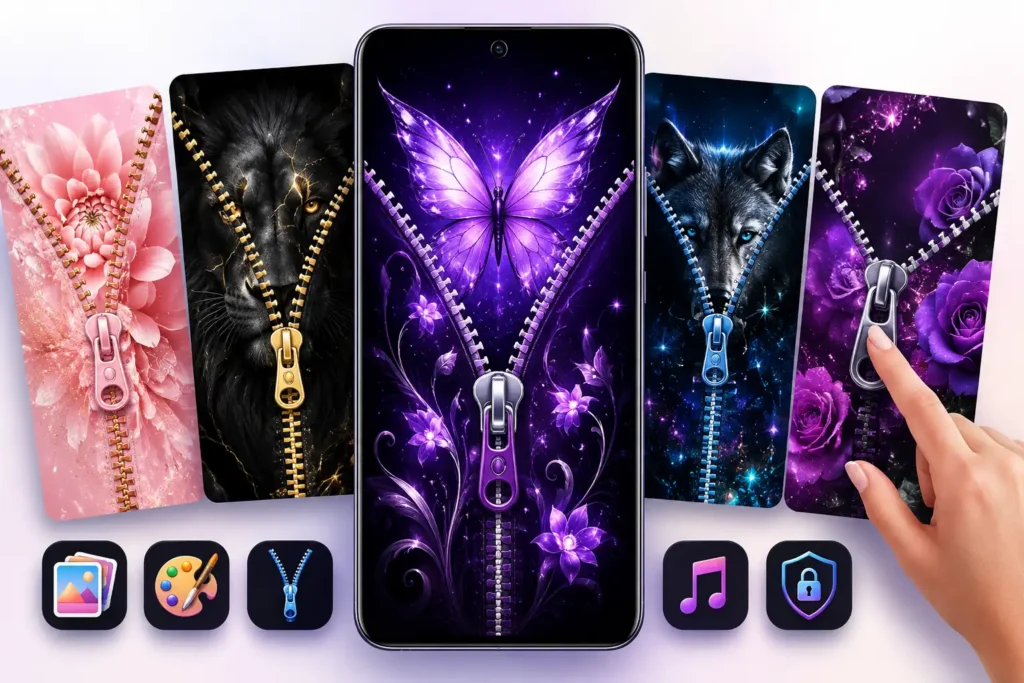
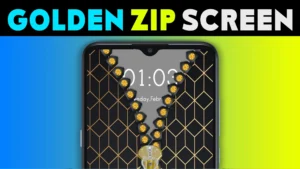
If you searched for Zipper Lock Wallpaper, you are probably looking for more than a new background. Apps such as Zipper Lock HD – HQ Wallpaper try to replace the ordinary feeling of unlocking an Android phone with an animated zipper that you drag open.
That can make an otherwise plain lock screen more entertaining. But there is an important question to answer before installing it:
Do you actually need a zipper lock-screen app, or would a normal wallpaper give you the customization you want with fewer complications?
Quick Answer
Zipper Lock HD – HQ Wallpaper is mainly worth considering if you specifically want the interactive zipper-unlocking effect.
It combines wallpapers, zipper designs and unlock animations rather than functioning as a conventional static wallpaper app. The supplied Google Play listing also shows that the app contains ads and offers in-app purchases.
The biggest thing to understand is that the zipper is primarily a personalization experience. You should not automatically assume that a third-party zipper screen provides the same security role as Android’s system PIN, password, pattern, fingerprint or face-unlock mechanisms.
If security is your priority, keep Android’s built-in device security enabled.
TNShorts verdict: Try it for the visual effect if you enjoy unusual phone customization, but don’t install it merely because you need a good wallpaper. Android’s normal wallpaper controls are simpler for that job.
Table of Contents
What Is Zipper Lock HD – HQ Wallpaper?
Zipper Lock HD – HQ Wallpaper is an Android personalization app from Amazic Fun Hub. Public app information lists package name com.zipperlock.ziplock.lockscreen, category Personalization, and version 1.0.8.
Its main idea is straightforward:
Instead of simply seeing a wallpaper and swiping your regular lock screen, the app creates a zipper-themed screen. You interact with the zipper to produce an animated opening effect.
The app description highlights:
- HD/HQ lock-screen wallpapers
- different zipper and chain designs
- zipper-opening animation
- customizable lock-screen themes
- zipper sound effects
- phone personalization options
Those features make the app fundamentally different from a wallpaper downloader. The interaction is the product; the wallpaper is part of the presentation.
Why People Search for Zipper Lock Wallpaper
There are two quite different users behind this search.
The first wants a zipper-style wallpaper because they like the visual design.
The second wants a phone that actually appears to unzip when unlocked.
If you’re in the first group, installing another lock-screen app may be unnecessary. Saving a suitable wallpaper and applying it through Android’s built-in wallpaper settings may accomplish what you want more simply.
If you’re in the second group, an app such as Zipper Lock HD makes more sense because a static image cannot reproduce the interactive zipper effect.
That distinction can save you from installing an app you don’t actually need.
What the Zipper Effect Really Changes
The interesting feature isn’t that a zipper is drawn on the display. It’s that the zipper reacts to your touch.
That matters for users who frequently customize their home screen, icons, widgets and wallpapers and want the lock screen to match that style.
It can also be fun when:
- building a coordinated phone theme;
- changing the phone’s appearance for a season or occasion;
- using a personal photo behind a decorative lock-screen design;
- making an older Android phone feel visually different without changing the launcher.
But there is another side to the feature.
Unlocking your phone is an action you may perform many times every day. An animation that feels novel on day one can eventually feel like an extra interaction if your priority is getting into the phone as quickly as possible.
That is probably the most important practical test for this category of app: not whether the zipper looks good in screenshots, but whether you still enjoy using it after the novelty wears off.
A Detail Many Users Overlook: Lock Screen vs. Security Lock
A decorative lock screen and Android’s actual device-security system should not automatically be treated as the same thing.
Android’s system security can protect access using mechanisms such as a PIN, password, pattern or supported biometric authentication.
A third-party personalization screen may instead operate as an additional visual/interface layer.
Therefore, don’t disable your normal Android security simply because a zipper interface appears before you reach the phone.
After setting up any third-party lock-screen app, test this yourself:
- Lock the phone.
- Wake it again.
- Go through the zipper screen.
- Confirm that your intended Android security protection still behaves as expected.
- Restart the phone and test again.
That five-minute check is more useful than assuming that a screen labelled “lock” is providing the security you expect.
The Notification Test Is Just as Important
There is another issue that screenshots cannot answer.
Your normal Android lock screen can be an information dashboard: calls, messages, alarms, media controls and other notifications may appear there according to your privacy settings.
When adding a custom lock-screen experience, check whether it changes how conveniently you can see or interact with those items.
Try receiving a message while the phone is locked. Test an incoming call. Set an alarm. Play music and lock the screen.
If the zipper effect looks attractive but makes everyday lock-screen information less convenient, the customization may not be worth the trade-off for you.
Will It Work Like the Screenshots on Every Android Phone?
Not necessarily.
Android devices differ substantially between manufacturers, and modern Android versions impose restrictions on apps running in the background. Battery-management systems can also behave differently across brands.
As a result, third-party lock-screen experiences can potentially behave differently from one phone to another.
If the zipper screen stops appearing consistently after some time, don’t immediately assume the wallpaper itself is broken. Check whether your phone has restricted the app’s background activity or whether the app needs to be enabled again.
At the same time, don’t disable broad battery protections for an app unless you understand why the change is required.
What About Battery Use?
An animated lock-screen app has a different workload from a static JPEG or PNG wallpaper.
It may need to maintain an interactive screen, animation and other behavior that a simple wallpaper doesn’t require.
That does not mean this particular app will necessarily cause significant battery drain. Battery impact depends on the device, Android version, configuration and app behavior.
A better approach is measurement.
After installing it, use the phone normally for a day or two and check:
Settings → Battery → Battery usage
If the app is consuming more battery than the customization is worth to you, switch back to the stock lock screen.
This is considerably more reliable than relying on generic claims that an app is either “battery friendly” or “battery draining.”
Things to Know Before Installing
The Google Play presentation supplied for this article identifies the app as containing ads and in-app purchases. That matters if you expected the experience to be completely free or advertisement-free.
More importantly, examine the permissions Android requests during setup.
A lock-screen personalization app can legitimately need access related to its functionality, but permission requirements can change between versions. Don’t approve a permission simply because an installation tutorial tells you to tap “Allow.”
Ask a simple question:
Does this permission make sense for the feature I’m enabling?
For example, choosing your own image can reasonably involve access to photos through Android’s appropriate media-selection mechanism. A request unrelated to the feature deserves more scrutiny.
You May Also Like
If a permission seems unnecessary, deny it first and see whether the functionality you actually need still works.
Safety and Privacy Considerations
The safest installation route is the app’s official Google Play listing rather than searching the web for modified or unofficial APK files.
Zipper Lock HD – HQ Wallpaper on Google Play
Google Play availability is useful, but it should not be interpreted as a guarantee that an app is risk-free or suitable for every user’s privacy requirements.
Before installing, open the current Data safety section and the developer’s privacy-policy information on Google Play. Check what data the developer currently declares as collected or shared and whether those practices are acceptable for you.
This is particularly important because app permissions, SDKs and privacy disclosures can change when an app is updated.
For that reason, TNShorts does not label this app “100% safe” or “unsafe” without evidence supporting such a conclusion.
Benefits
The strongest advantage is obvious: it makes unlocking an Android phone visually unusual.
For someone bored with the standard lock screen, the combination of zipper animation, backgrounds, themes and sounds provides substantially more visual personality than simply changing a wallpaper.
Keeping those related customization options in one app can also be convenient for users who enjoy changing themes frequently.
And unlike replacing the entire Android launcher, a lock-screen customization can focus on one specific part of the phone experience.
Limitations
The same feature that makes the app interesting can also become its biggest weakness.
The zipper adds another visual interaction to something Android is normally designed to make quick.
Other limitations to consider include:
Ads: The supplied Play listing indicates that the app contains advertising.
In-app purchases: Some content or experiences may therefore not be included in the basic free experience.
Device-dependent behavior: Third-party lock-screen behavior may vary between Android versions and manufacturers.
Possible extra resource use: An interactive screen is inherently more involved than setting a static wallpaper, although actual battery impact should be measured on your own device.
Not a reason to replace Android security: Treat the visual zipper and your system authentication as separate considerations unless the developer explicitly documents otherwise.
Novelty: The animation may be enjoyable initially but unnecessary for users who unlock their phones very frequently.
Who Should Use It?
Zipper Lock HD is most suitable for someone who:
enjoys customizing almost every part of Android, specifically wants an interactive zipper animation, likes frequently changing wallpapers and themes, and doesn’t mind spending an extra moment on the lock-screen experience.
It can also be a fun choice for a secondary phone where visual customization matters more than maximum efficiency.
Who Should Avoid It?
Skip it if you want the fastest possible route from a locked phone to your apps.
It is also unnecessary if your only goal is to put a beautiful picture on the lock screen. Android already provides native wallpaper functionality, so adding another lock-screen application for that purpose alone introduces complexity without much benefit.
Users who strongly minimize third-party apps with lock-screen-related functionality may likewise prefer Android’s built-in implementation.
Better Alternatives Depend on What You Actually Want
There isn’t one alternative that’s automatically better.
For a simple wallpaper: Use Android’s built-in wallpaper picker. It provides fewer decorative effects, but there is no need to add a separate zipper interface.
For deeper visual customization: Your phone manufacturer’s theme system may be more appropriate. Samsung Galaxy Themes and similar manufacturer tools can integrate wallpapers and other visual elements more closely with the device.
For a completely different home-screen experience: A reputable Android launcher is the more relevant category. Launchers primarily customize the home screen and app navigation rather than reproducing a zipper lock.
For the zipper itself: Zipper Lock HD remains relevant because the unusual unlock animation is precisely the reason to install this category of app.
Choose according to the experience you want rather than the number of customization features advertised.
A Good 2-Minute Test After Installation
Don’t decide whether to keep the app immediately after seeing the first zipper animation.
Instead, test four things:
Unlock speed: Does it make accessing your phone noticeably less convenient?
System security: Is your PIN/password/biometric setup still behaving as you expect?
Notifications: Can you still access the lock-screen information you rely on?
Reliability: Lock and unlock the device repeatedly, and test again after restarting it.
Then check battery usage after normal use.
If those checks pass and you still enjoy the zipper effect, the app is serving its purpose. If not, a static lock-screen wallpaper is probably the better choice.
Frequently Asked Questions
Is Zipper Lock HD – HQ Wallpaper a wallpaper app or a lock-screen app?
It is better understood as a lock-screen personalization app with wallpapers. Its distinguishing feature is the interactive zipper-style unlocking experience rather than wallpapers alone.
Does the zipper replace my Android PIN or fingerprint?
Don’t assume that it does. Keep your Android system security configured and test how the zipper screen interacts with your PIN, password, pattern or biometric authentication.
Is Zipper Lock HD free?
The supplied Google Play listing shows an Install button and states that the app contains ads and in-app purchases. Some optional content or functionality may therefore involve payment.
Can I use it just for wallpapers?
Possibly, depending on the available options, but if you only need a lock-screen background, Android’s built-in wallpaper settings are generally the simpler solution.
Can a zipper lock-screen app affect battery life?
An interactive lock-screen app does more than a static wallpaper, but the meaningful question is its actual consumption on your phone. Check Android’s Battery Usage screen after using it normally rather than relying on generalized battery claims.
Why might a zipper lock screen stop appearing?
Android background restrictions, battery optimization, app settings or device-specific behavior can potentially affect third-party lock-screen apps. Check those factors before repeatedly reinstalling the app.
Should I download a Zipper Lock APK from another website?
If the app is available to you through Google Play, using its official Play listing avoids the unnecessary risk of obtaining modified packages from unknown download sites.
Is Zipper Lock HD safe?
There isn’t enough basis to responsibly promise that any third-party app is completely safe. Review its current Google Play Data safety information, privacy policy and requested permissions before deciding whether they meet your requirements.
Final Recommendation
Zipper Lock HD – HQ Wallpaper makes sense for a specific type of Android user: someone who wants the phone-unlocking process itself to become part of their visual customization.
Its appeal is the zipper interaction combined with themes, wallpapers and sound effects. Its trade-offs are equally straightforward: another lock-screen layer can add friction, advertising and potentially additional background activity compared with simply using Android’s stock lock screen.
If you install it, don’t judge it only by how impressive the first animation looks. Check notification handling, unlock reliability, system security behavior and battery usage in normal daily use.
If all four work well on your phone and you enjoy the effect, it is worth keeping.
If you only searched “Zipper Lock Wallpaper” because you want an attractive background, skip the extra lock-screen layer and use a normal wallpaper instead.
Editorial Disclosure
TNShorts publishes independent Android app reviews, guides, comparisons, and educational content.
Content is based on publicly available information, practical analysis, and user-focused evaluation. Features, pricing, permissions, privacy practices, and availability may change over time. Readers should verify important information through official developer sources before making decisions.