
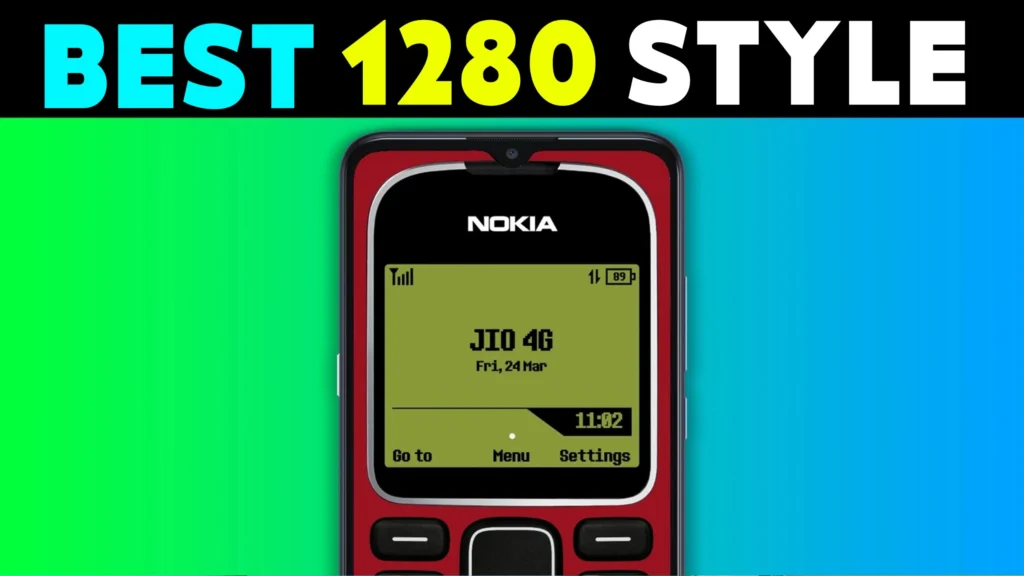
In today’s fast-moving digital world, many of us miss the simplicity of old mobile phones. The classic Nokia 1280 was one of the most iconic phones of all time. If you’re someone who wants to relive those simple days, there’s good news!
🎉 The Nokia 1280 Launcher app brings the legendary user interface of the Nokia 1280 right into your modern Android smartphone. From the T9 keypad to the black-and-white UI style, this launcher recreates the complete retro mobile phone experience.
All those applications are taken from play store, we recommend fearlessly as the application is published after following best policy in play store.
Play Store Nokia Launcher Details
🔍 App Details
| App Feature | Description |
|---|---|
| ⭐ Name | Nokia Launcher |
| 🧩 Developer | Color Studios |
| 📅 First Released | Dec 8, 2022 |
| 🔄 Last Updated | Oct 22, 2024 |
| 📲 Downloads | 1M+ |
| 🌟 Rating | 4.1 (2.24K reviews) |
🌟 What Makes Nokia 1280 Launcher So Special?
🎨 1. Classic Nokia 1280 Theme
You’ll instantly feel the old Nokia vibe the moment you install this launcher. The home screen, menu style, and layout take you back to the early 2000s.
🔢 2. T9 Keypad on Home Screen
Yes! You can use a real T9 keyboard on your home screen. Dial numbers like the old days, save contacts Nokia-style — no fancy tricks, just pure retro.
🌐 3. Hot Key Navigation
Each button has a special action:
- Top Button – Flashlight 🔦
- Right Button – Camera 📷
- Bottom Button – Contacts 📇
- Left Button – Messages 💬
Simple. Fast. Functional.
⚙️ 4. Custom Settings Like Old Phone
You can adjust wallpapers, change phone name, and tweak your theme – all in a layout that looks just like the settings from an old Nokia phone.
🔁 5. Quick Switch Back Option
Long press the End Call button to quickly switch between this launcher and your default launcher. That’s pure convenience!
🎯 Who Should Use This App?
- 📵 Elderly people who feel modern phones are too complex
- 🧓 Parents or grandparents used to the old keypad phones
- 🧒 Young users who want to see what classic mobile phones were like
- 💖 Retro lovers and nostalgic users
This is not just a launcher; it’s a time machine.
⚠️ Disclaimer
This app is a fan-made launcher and is not officially linked with Nokia Corporation. It uses public UI styles to recreate the old experience for users. No copyright content is used. All rights belong to their respective owners.
You May Also Like
![Epic Themes Launcher App 2026 [ELEGANT THEMES]: Is It Worth Trying for Android Customization?](https://tnshorts.com/wp-content/uploads/2026/05/epic-themes-launcher-app-2026-300x225.png "Epic Themes Launcher App 2026 [ELEGANT THEMES]: Is It Worth Trying for Android Customization? 4")
📥 How to Download Nokia 1280 Launcher App
- Click here 👉 Nokia 1280 Launcher – Play Store
- Tap “Install”
- After installing, press the Home button and select Nokia 1280 Launcher
- Set it as your default launcher
That’s it! You’re now using a phone from 2005.
✅ Pros and ❌ Cons
| ✅ Pros | ❌ Cons |
|---|---|
| Free to use | Not officially from Nokia |
| Works offline | Limited features compared to modern launchers |
| Real T9 keypad | May not support gestures |
| Very lightweight | No iOS version |
| Great for nostalgia | Ads may appear sometimes |
🔍 Enhanced FAQs
❓ Is the Nokia 1280 Launcher safe to use?
Yes, it is available on the Play Store and developed by Color Studios with over 1M downloads.
❓ Can I use it without internet?
Absolutely! The launcher works fully offline.
❓ Does this app support iPhones?
No, the Nokia 1280 Launcher is only available for Android devices.
❓ How to remove the launcher?
Go to Settings > Apps > Nokia 1280 Launcher > Uninstall.
❓ Will it replace my current launcher permanently?
No. You can switch back anytime by long pressing End Call and choosing your old launcher.
Let’s talk about Old Nokia 1280 Launcher!
We are providing you these mobile applications only through play store without finding them on any other platform. Nokia 1280 Launcher is an opportunity to use it on your Android phone without missing out on the old days of the present, and it’s available through the Google Play Store with official policy and contact mail: colorstudioapp@gmail.com, and added features for security.
More Articles You May Like
 NEW STYLE Nextron Launcher 2026: Should You Try This Android Launcher?
 Tree Launcher App for Android 2026 – Features, Benefits & Safe Alternatives
 SpaceWalker Space Theme Launcher App for Android 2026 – What It Does and Why Users Install It
 What Is New CMM Launcher Apps on Android (ULTIMATE LAUNCHER 2026)?